Select Variables/Regressors Dialog Boxes |
Many of the Wizards that involve lists of series include a "series list button" ( ) that you can click on to select variables from a list of those currently available in memory.
For cases where RATS is only expecting a simple list of series, the dialog box will look something like this:
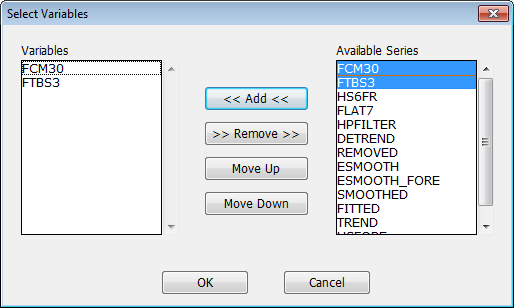
The left (Variables) is the target list that you're constructing. To add series to it, double-click on the name of a series in the Available Series column, or select (highlight) one or more variables and and click on the Add button (use <Shift>+Click to select a range of variables, <Ctrl>+Click to select an additional variable).
To remove a variable from the list, select it in the Variables list and click on the Remove button. To change the ordering of the list, select one or more variables and click on the Move Up or Move Down buttons as needed.
Once you've added the series you want, click on OK. The selected series will be listed in the appropriate field in the Wizard.
For cases where the list in the Wizard can include lags and leads, the dialog box will look something like this:
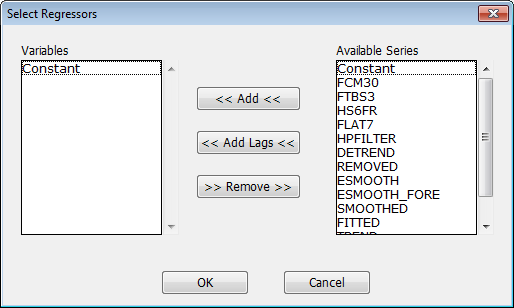
This functions much like the box described above, except that clicking on Add Lags allows you to add a list of lags and/or leads to the variable(s) being added.
Copyright © 2025 Thomas A. Doan