|
Wizards / Calendar Wizard |
The Calendar Wizard dialog box is shown below—the fields available will depend in part on the settings you select. Note that you normally do not need to use the Calendar Wizard if you will be using the Data Wizard to read your data.
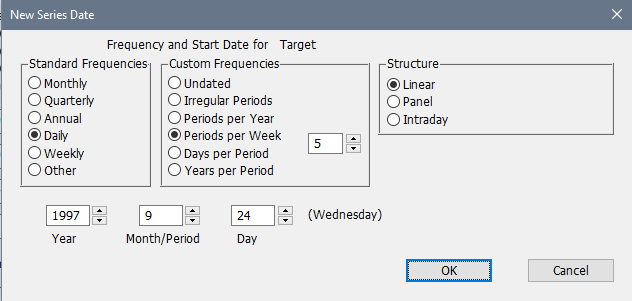
Once you select the desired frequency and enter values for any required fields, just click on OK and RATS will generate the appropriate CALENDAR instruction in the input window. It will also execute that command automatically if the "Paste AND Execute" switch on the Window menu is turned on.
Standard Frequencies
The radio buttons here handle the most common frequencies. Other gets selected automatically if you make a change in the Custom Frequencies category.
Custom Frequencies
Use these buttons if you need some less standard frequency. For instance, semi-annual would be done by clicking Periods per Year then putting 2 in the information box.
Structure
Most time series data will be Linear. If you choose Panel or Intraday a numerical field will appear in which you fill in either the number of time periods per individual (for panel) or the number of time periods per day (for intraday).
Year, Month/Period, Day
These text boxes with spin buttons appear as needed depending upon the choices for the frequency. With quarterly or monthly data, you must set the starting Year and Month/Period. With daily or weekly frequencies, a Day box will also appear and a day of the week will show to the right of the Day box, and will be updated as you change the information.
Copyright © 2025 Thomas A. Doan