Dialog Box: Wall Chart |
The "Sort Wall Chart" dialog box appears whenever you select the Report>Print Wall Chart (detailed) menu operation. When you are ready, just click on "OK" to begin printing the wall chart(s). For individual or combined individual team tournaments, you'll see the dialog box on the left. For a team tournament, you'll see the box on the right:
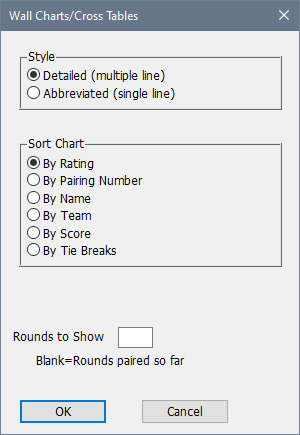

Style
Select a detailed wall chart, or a more compact cross table format.
Sort Chart
You can sort the players by their rating, pairing number (usually the same as by rating, except for round robin and similar sections), name, team, score or tie break standings. The default choice is by rating.
Team Listing
Individual Listing
These two choices are only available for team sections. The Team Listing switch produces a chart listing only the team, while the Individual Listing switch produces a chart which lists the individual players. If both are on, you will get two separate wall charts. If neither one is turned on, the operation won't produce any output for that section.
Rounds to Show
To include only the rounds paired so far (for a cross table, the rounds completed so far), leave this field blank. If you want to include a specific number of rounds in the printout, put that number here. For example, you might use this feature to verify that byes for future rounds have been entered correctly, or you can reconstruct the standings after an earlier round.
Copyright © 2026 Thomas Doan