Page 1 of 1
Syntax highlighting
Posted: Wed Feb 16, 2011 7:09 pm
by Henrique Andrade
Dear RATS Community,
According to Wikipedia:
Syntax highlighting (
http://en.wikipedia.org/wiki/Syntax_highlighting) is a feature of some text editors that display text—especially source code—in different colors and fonts according to the category of terms. This feature eases writing in a structured language such as a programming language or a markup language as both structures and syntax errors are visually distinct.
I would like to have syntax highlighting in RATS. In my humble opinion, this simple feature makes the programming task more enjoyable.
What do you think?

Best regards,
Re: Syntax highlighting
Posted: Thu Feb 17, 2011 5:31 am
by ac_1
Henrique Andrade wrote:Dear RATS Community,
According to Wikipedia:
Syntax highlighting (
http://en.wikipedia.org/wiki/Syntax_highlighting) is a feature of some text editors that display text—especially source code—in different colors and fonts according to the category of terms. This feature eases writing in a structured language such as a programming language or a markup language as both structures and syntax errors are visually distinct.
I would like to have syntax highlighting in RATS. In my humble opinion, this simple feature makes the programming task more enjoyable.
What do you think?
Best regards,
Yes, this is a great idea! I would also like this feature.
In MATLAB, each line in the editor is numbered and then in the Command Window if there is an error in code the compiler indicates at what line and where the error is: either Main Program and/or Function(s). This would also be useful in RATS as-well.
Re: Syntax highlighting
Posted: Thu Feb 17, 2011 3:17 pm
by TomDoan
Yes, that's a good idea. It's a bit harder with RATS than with the types of programs you're discussing for several reasons:
1. RATS has many more "keywords". Most programming languages have only about a dozen control words (like function, if, else), some pre-defined data types and everything else is an expression. RATS has those control words plus about 180 other instructions which makes a recognizer a bit more difficult.
2. If you're in the "input" window, RATS is actively watching what you type for Enter keystrokes that will execute instructions. If you look at the behavior of a syntax coloring scheme in a "passive" editor, it will often switch the colors of large chunks of text as type and a line apparently switches to and from being (say) a comment. That's not a problem in that type of situation because the computer can analyze and re-analyze faster than you can type. We would have to be much more careful about turning the analyzer on and off to avoid slowing the execution of the program.
3. We have editors on three distinct platforms (Windows, Mac, Unix) which all have very different text editors.
Before we get to the syntax highlighting, we'll probably add the simpler "bracket" matcher, which looks for matches to { } and () combinations, counting through nesting levels.
Re: Syntax highlighting
Posted: Mon Feb 21, 2011 4:52 pm
by Henrique Andrade
Dear Tom,
And if we could use syntax highlighting only in some places, like comment lines?
Re: Syntax highlighting
Posted: Tue Jul 26, 2016 11:43 am
by dannec
Dear RATS Community,
I have written a package that highlights RATS syntax in two cross-platform text editors, Atom (
https://atom.io/) and Sublime Text (
https://www.sublimetext.com/). You can download the package at
https://github.com/chrstdanne/Rats-Syntax-Highlighting.
Best,
Christian
Re: Syntax highlighting
Posted: Fri May 08, 2020 11:20 am
by TomDoan
Thanks. We'll take a look at what you did. The original post was from 2011 and since then we've switched to a common editor (Scintilla) which has "lexers" to help with colorizing text. The bracket matchers that I mentioned (which is a completely different operation and is usually not included in colorizing) are already included.
Scintilla also has a "folding" mechanism which squishes an entire function (procedure) down to a single place holder so you can remove from view chunks of the program which aren't of immediate interest without actually editing them out.
Re: Syntax highlighting
Posted: Sat May 09, 2020 10:00 am
by TomDoan
This is a preliminary example of syntax highlighting. (The comments are in green, quoted strings in red; an unclosed quoted string will be red underline). This also shows what this looks like with line numbers.
One minor issue is with the fact that RATS has both input and output windows (and sometimes single windows have both). I'll try to look into how easy it would be to style output differently from program statements.
These would all be set up to be optional with colors that can be selected by the user. Suggestions are welcome.
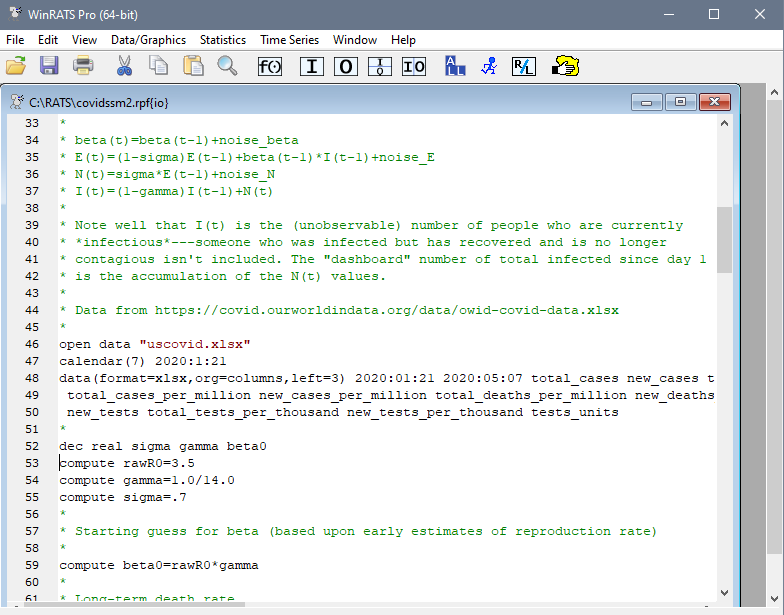
- Screen shot with syntax highlighting
- syntax highlight.png (45.82 KiB) Viewed 90769 times
Re: Syntax highlighting
Posted: Tue Nov 24, 2020 2:42 am
by AdamElderfield
This looks really good! I think there are some really great examples that could be used for inspiration for future development. For example, copying and pasting RATS code into notepad++ or VScode gives user the ability to "tab complete" their coding, by this I mean users can start typing a variable name and all the options of names like it come up (see screenshot for example)
This would make coding in RATS much easier!