|
Wizards / Limited/Discrete Dependent Variable Wizard |
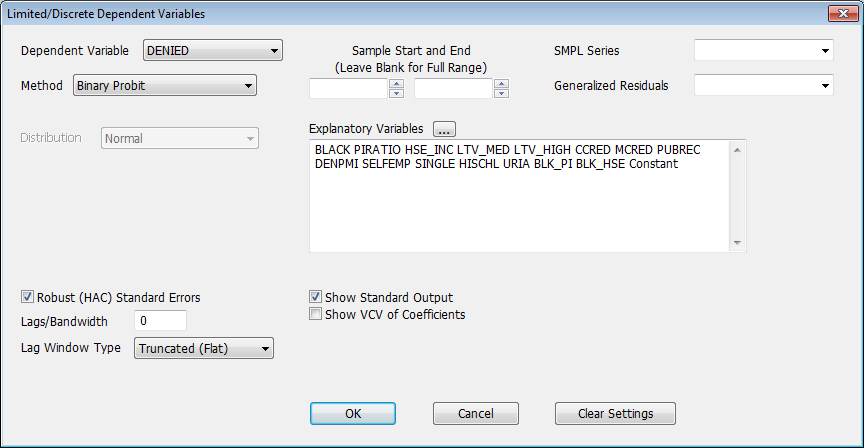
The Limited/Discrete Dependent Variables Wizard on the Statistics menu performs estimations involving limited or discrete dependent variables, including probit, logit, and related models. The Wizard will invoke an LDV or DDV instruction, depending on the model chosen. Selecting the Wizard brings up the following dialog box:
Dependent Variable
Use the drop down list to select the desired dependent variable.
Method
Use this field to select the estimation method. The discrete dependent variable methods are "Binary Probit", "Binary Logit", "Binary Choice", "Ordered Choice", "Multinomial Choice", "Conditional Logit", and "Count Model (Poisson)".
The limited dependent variable method choices are "Censored (Tobit)" and "Truncated Regression". Note: the INTERVAL option on LDV is not supported by the Wizard—use the LDV instruction manually with the appropriate options to estimate this kind of model.
Distribution
Choose the distribution for the underlying model. The choices are "Normal", "Logistic", and "Extreme Value". The "default" choice varies depending on the method currently selected, and this field is disabled for certain models, where there is only one distribution supported.
Individual ID's, Mode ID's
These fields are only visible when the "Conditional Logit" method is selected. Use the Individual ID field to indicate which series identifies the individuals in the data set. The Mode ID's choice is optional—you can use it to select an identifying series for the choices made. See DDV for details.
Lower Limit, Upper Limit
These fields are only visible when one of the limited dependent variables methods ("Censored (Tobit)" or "Truncated Regression") is selected. Use them to indicate the series containing the lower and/or upper bound values.
Sample Start and End
Use these fields to set a specific starting and/or ending date/entry for the estimation.
SMPL Series
Use this option to select a series to be used for the SMPL Option.
Generalized Residuals
You can use this field to save the generalized residuals from the estimation. You can type in a new name, or select one of the existing series from the drop-down list.
Explanatory Variables
Use these fields to select the explanatory variables. You can either type in a list of explanatory variables in Regression Format, separating variables with at least one blank space, or click on the series list button  to select from a list of the series available with a Select Regressors dialog box.
Robust (HAC) Standard Errors
Lags/Bandwidth
Lag Window Type
These generate ROBUSTERRORS, LAGS, and LWINDOW options. See Robust Error Calculations for details.
Show Standard Output
Turn this off if you want to suppress the output from the regression (this adds a NOPRINT option to the estimation instruction).
Show VCV of Coefficients
Displays the estimated variance/covariance matrix (adds a VCV option).
Clear Settings
Click this button to clear out all selections and reset the dialog box to the default state. Note that if you have already executed a regression, RATS will "pre-load" the Wizard with the dependent variable, regressors, and other settings of the most recent regression, making it easy to repeat an earlier estimation with slight modifications. If you instead want an entirely new regression, you can use Clear Settings to clear out the old information.
Copyright © 2025 Thomas A. Doan