How To: Divide Players into Sections |
What we're talking about here is a tournament where players are assigned to sections by the TD. WinTD has a function designed to produce a set of sections of a roughly fixed size: usually small round robins, such as quads, hexes or octos. If your sectioning is a bit more free form (maybe eight in the top section, twelve in the next and twenty in a couple of lower ones), create the sections needed, then list all the players and sort by rating. Select groups and drag and drop them into the sections.
To use the automatic sectioner, all you need to do is create a single "template" section. Put all the players in it. You need to be very careful about your settings, as most of them will be copied to the other sections that get formed.
•It should have a section "short title" which ends in either an "A" or "1": "Sect A" for instance.
•Set the Pair As box to "Round Robin" in the Pairing Rules tab if you're going to be making Round Robin sections. Do this even if you'll allow one of the sections to be run as a Swiss.
•Set the correct first board number. The other sections will be numbered automatically based upon that.
•Set the teammate pairing restriction if you want teammates to be assigned to different sections. (This will not take into account club or state restrictions).
•Set the games per round box if you're playing more than one game per round (double blitz, for instance).
With this done, select the template section and do Section>Divide Up… This will bring up the following dialog box:
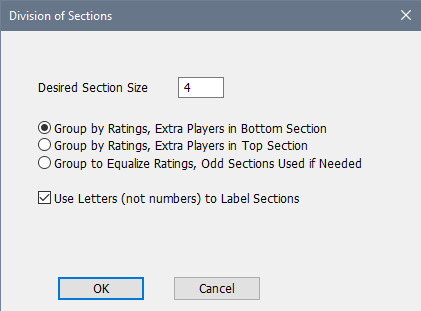
Set your desired section size. You have two basic choices for how to section the players: either grouped by rating, or grouped to attempt to equalize the average ratings. The first of these is fairly straightforward. As long as there are no teammate conflicts, the players are put into sections of the requested size. If the number of players isn't a multiple of the section size, either the top or bottom section will be expanded as required. For instance, if you're doing quads and have 19 players, you'll end up with three four player sections and one seven player section. Note that the odd player section will still inherit the pairing method from the template section. If you want it to be run as a Swiss instead of an Round Robin, you'll need to change the Pairing Method to Swiss for that section. If you set a restriction against pairing teammates, in case of a conflict, the higher rated player will stay in the higher section, and lower rated players will be moved down.
If the grouping is to equalize average ratings, WinTD determines how many sections are needed to accommodate all the players in sections no larger than the requested size. For instance, with 37 players and a desired size of six, it will make seven sections. Five of these will have five players and two will have six. The players are sorted by rating, and the highest rated players are assigned to the sections in order. The next highest rated players are assigned in reverse order. At that point, the average ratings are computed for all the sections. The next available player will be assigned to the section with the lowest average. The next after that will go into the section with the second lowest rating. This will continue until all sections have three players. The average ratings will again be computed, and the fourth players will again be assigned with the highest rated player remaining going into the section with the lowest average through three players.
Your final choice is whether to use letters or numbers to label the sections. If you choose letters, WinTD will look at the short title of your template section. If it ends with A, WinTD will create sections with that letter replaced by B, C, D,… If it ends with anything other than A, WinTD will simply append the letter to the existing name. This generated name is used for both the section title and its short title. If you choose numbers, WinTD will look for a 1 at the end of the name, and replace it with 2, 3, … if it finds it; otherwise appending the generated number to the name.
Copyright © 2026 Thomas Doan