ROLLREG Procedure |
@ROLLREG is a procedure to do various types of "rolling" linear regressions. This was written originally by economists at the Bank of Canada.
@ROLLREG( options ) depvar first last
# list of explanatory variables (in Regression Format)
Parameters
|
depvar |
dependent variable |
|
first , last |
these help to determine the ranges for the regression when combined with the MOVE, ADD or DROP option. |
Options for controlling rolling samples
MOVE=width of moving window
Starting with a regression from first to first+MOVE width-1, adds observations to the end and drops them from the start one at a time until it does a regression from last-MOVE width+1 to last, that is, there are MOVE width observations in each regression
ADD=end of initial period
Starting with a regression from first to the ADD option value, adds one observation at a time to the end of the range until it does a regression from first to last. What ADD does could be handled more efficiently by the RLS instruction.
DROP=start of last regression range
Starting with a regression from first to last, drops one observation at a time from the beginning of the range until it does a regression from DROP option value to last
Other options
ROBUST/[NOROBUST]
Uses the ROBUSTERRORS option to calculate the standard errors.
LAGS=number of lags to use with the ROBUST option [0]
LWINDOW=[NEWEY]/BARTLETT/DAMPED/PARZEN/QUADRATIC
Chooses lag window type if LAGS>0.
COHISTORY=(output) VECT[SERIES] for the coefficients
SEHISTORY=(output) VECT[SERIES] for the standard errors of the coefficients
SIGHISTORY=(output) SERIES for the regression standard errors
These are all similar to the options for the RLS instruction.
FHISTORY=(output) SERIES with regression F's
PRINT/[NOPRINT]
WINDOW="title for print window"
Prints a table with the coefficient estimates. With WINDOW, it goes into a separate Report Window.
GRAPH/[NOGRAPH]
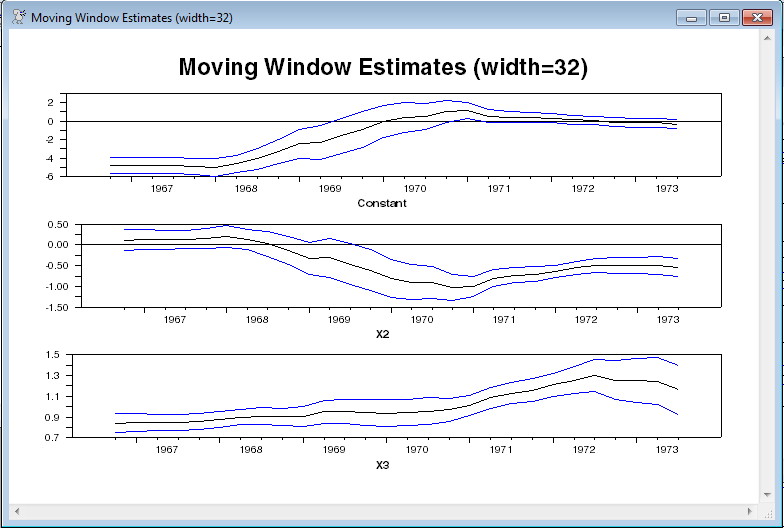
With GRAPH, graphs the coefficients with two standard error bands.
Example
open data auto1.asc
cal(q) 1959:1
data(format=prn,org=columns) 1959:1 1973:3 x2 x3 y
*
* If you use the GRAPH option, a separate graph is generated for each
* coefficient with the running estimates and two standard error bands.
* You can wrap the use of @RollReg in an SPGRAPH to make those panes on
* a single page.
*
* Moving window estimates, using a window of width 32
*
spgraph(vfields=3,header="Moving Window Estimates (width=32)")
@rollreg(graph,move=32) y
# constant x2 x3
spgraph(done)
*
* Expanding window estimates with first regression running through 1965:1
*
spgraph(vfields=3,header="Expanding Window Estimates")
@rollreg(graph,add=1965:1) y
# constant x2 x3
spgraph(done)
*
* Contracting window estimates with final regression starting in 1969:1
*
spgraph(vfields=3,header="Contracting Window Estimates")
@rollreg(graph,drop=1969:1) y
# constant x2 x3
spgraph(done)
*
* Other options
*
* Displaying coefficients in a report window
*
@rollreg(print,move=32) y
# constant x2 x3
*
* Saving into a VECT[SERIES]
*
@rollreg(cohist=cohist,move=32) y
# constant x2 x3
copy(format=free,org=colums,unit=output) / cohist
*
* With HAC standard errors
*
spgraph(vfields=3,header="Moving Window Estimates with HAC Standard Errors")
@rollreg(graph,robust,lags=4,lwindow=newey,move=32) y
# constant x2 x3
spgraph(done)
Sample Output
This is how a graph looks if you wrap the procedure call inside an SPGRAPH. If you don't, there will be a separate graph for each coefficient.
This is what is produced by the PRINT option.
ENTRY Constant X2 X3
1966:04 -4.761185930838 0.113767505558 0.842047258451
1967:01 -4.797516325896 0.127822358489 0.848764103881
1967:02 -4.795956067159 0.127212999127 0.848474325303
1967:03 -4.802042019714 0.128265095933 0.848171710544
1967:04 -4.902503871897 0.161834240309 0.860841263026
1968:01 -5.002516431152 0.200518123322 0.878949334168
1968:02 -4.626710143013 0.137656716146 0.897886120707
1968:03 -4.068189217665 0.026898029693 0.907400566544
1968:04 -3.304843471982 -0.141646296819 0.902382342489
1969:01 -2.437531479678 -0.327921595905 0.902250761965
1969:02 -2.289279023782 -0.314337834388 0.950659775805
1969:03 -1.597996335957 -0.460857629550 0.952798179229
1969:04 -0.909938962533 -0.614891405392 0.946135232878
1970:01 -0.036819078916 -0.809968863930 0.938343462725
1970:02 0.397971797836 -0.897480533753 0.944999513773
1970:03 0.473404681790 -0.901537022637 0.958250140200
1970:04 1.066026825960 -1.015792311129 0.973136727987
1971:01 1.155877707395 -0.999391768011 1.012127476841
1971:02 0.541729178105 -0.798612203409 1.086147971455
1971:03 0.424722362557 -0.733379136735 1.129566308289
1971:04 0.391077588596 -0.700256785593 1.157662831523
1972:01 0.324641947446 -0.638510443670 1.209122829016
1972:02 0.140772446193 -0.554579418902 1.257082756085
1972:03 0.039154529481 -0.493866185046 1.299209817436
1972:04 -0.126632124011 -0.499396515712 1.254460127064
1973:01 -0.160657115324 -0.496774613173 1.249389387485
1973:02 -0.185624950645 -0.494028993024 1.246763022871
1973:03 -0.332617872518 -0.539890833825 1.162344575656
Copyright © 2026 Thomas A. Doan