How To: EMail/Text Pairings |
This requires quite a bit of setup and also requires that you have reliable Internet access at your tournament site. If you're relying on site wi-fi, you might have bandwidth problems if you have a large tournament and the participants can use the wifi as well for such things as streaming video. Assuming that you've decided to go ahead with this, you need to do the following:
1.Find out the host and port numbers that you plan to use for sending the text messages and e-mails. This has nothing to do with the network at the site—this would be information from your ISP. Usually, it's the same information configuration information that you use for your e-mail program. Note that gmail (and this may apply to other "free" services) severely restricts the ability to send large numbers of e-mails. You can probably successfully run a relatively small tournament e-mailing pairings on a gmail user ID, but not a large one.
2.You will also need the user ID and password used for sending e-mail. Note that this isn't (necessarily) the same one as will be used as the "sender" of the actual e-mails—it's just the user ID for associated with sending mail.
3.Open the Other tab on your Preferences Dialog Box. Fill in the information from (1) and (2). Make sure you save the preferences.
4.Create a spreadsheet with columns for (at least) the email address, and player ID, name or team (or any combination of those). The string in the EMail column is either the e-mail or the e-mail equivalent for the cell phone—there can be one or more players associated with any e-mail address. The following is an example
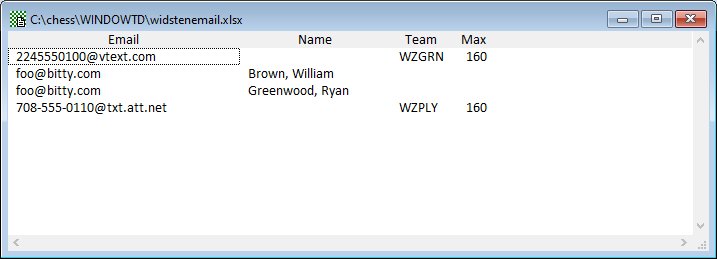
5.To send a text message, you need to know the e-mail equivalent of a cell phone number. How that looks depends upon the service provider for the phone. The first and fourth lines have the standard format for Verizon and AT&T service. Note that text messages (unlike e-mails) are limited to 160 characters. If you are willing to send text messages to people with more than about four or five players, you need to also add a field to your file which gives the maximum number of characters in a message.
6.This file is set up to text-message pairings for everyone on the WZGRN team to the phone number 224-555-0100. If the text doesn't fit in 160 characters, it will be broken up into two or more messages. The pairings for William Brown and Ryan Greenwood will be e-mailed to foo@bitty.com and the pairings for the WZPLY team will be texted to 708-555-0110.
7.Open the spreadsheet in WinTD using the Data>Open Data Table operation. (Make sure you pick the correct format). Once it's open, execute the Data>Set as EMail/Text List operation.
8.When you have rounds paired, open a Game Window in the normal way. If you want pairings to be combined across sections, open this with Sections>List Games, Combined Sections. Execute the Reports>E-mail/Text Pairings operation. This will pop up a dialog box like
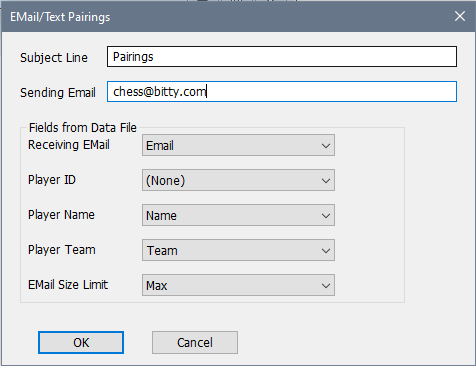
You don't have to use the field names that we did, though it helps, since WinTD will feed the proper columns into the popup boxes if it finds matches. The Sending Email will be what the recipient sees as the sender of the e-mail. You want that to be an address at which you can receive reply e-mails such as bounce messages.
When you OK, this, WinTD will walk through the rows of the e-mail list and check for games involving players who match the criteria from the Team, Name or ID fields. If the same email address is used on consecutive lines (as we did with foo@bitty.com), the pairing information is batched together into a single email, and the same thing happens if you use a team code. If a player is not in the current Game window (if, for instance, you only included games from one section, and he is in another), that player would be skipped in this batch.
Ideally, it takes about two to three seconds per e-mail sent (not per player). However, it might take longer if the bandwidth is being heavily used, so you might want to check into the situation at your site if you're not using your own mobile hot spot.
Copyright © 2026 Thomas Doan