How To: Print Team Rosters |
If you are running a combined individual/team tournament, WinTD will allow you to print out "team rosters" to give to the coaches. These will allow them easily to verify the registration information for their players.
Team rosters (as printed by WinTD) are blank "wall charts" or "cross tables" and include the player's names, ID's, prize groups and ratings. In addition, it, in the "wall chart" format, it provides blank cells that the coaches can use to fill in the pairings and scores for their players.
A separate page is printed for each team which meets criteria which you set.
To create team rosters:
1.Select the set of sections for which you want to print rosters. If you select more than one, WinTD will combine all players from a single "team" (those with matching team fields) onto a single roster, but will separate the players by section.
2.Use the Reports>Print Team Rosters operation. This will bring up the following dialog box:
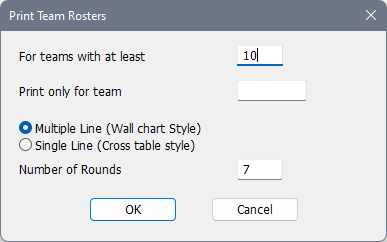
For Teams with at Least
Fill in a minimum number here that will generate a page. If you leave it blank, you have chosen 0 as the threshold, so any single player with a unique team ID will force out a page. For practical reasons, a number like 3 to 5 probably makes sense. (This is set to 10 for a larger tournament).
Print only for Team
If you fill this in, a roster is generated only for the single team (code) that you list.
Multiple Line (Wall chart style)
Single Line (Cross table style)
This determines the format. The multiple line format always the space for three lines, includes extra information and boxes to fill in for the pairings and results. The single line format is mainly just a registration check-in aid.
Number of Rounds
This sets the number of blank game cells in the grid (here 7). This is only available in the Multiple Line style
Copyright © 2026 Thomas Doan