US Chess Database |
The US Chess "Golden" database can be downloaded from the "tournament directors" area on the federation's web site. At this time, they are produced monthly, and are typically available about 10 days before the start of the month in which they take effect.
WinTD uses the database in two ways:
•You can look up player's ratings and expiration dates when adding them to a tournament or master player file. Just use the US Chess Database tab in the Add/Edit a Player Dialog.
•You can automatically update the ratings and expiration dates on a master player file or on a tournament file. See How To: Update Players' US Chess Ratings.
Before you can use the rating database with WinTD, you need to tell the program where to find the information. Do this with the US Chess>US Chess Directory... operation. This pops up a dialog box asking you to specify the directory containing the US Chess files. By default, this is (under Windows) C:\TNMTADMT which is where it was saved historically.
Beginning in September 2026, the US Chess>Download US Chess Database... operation again works.
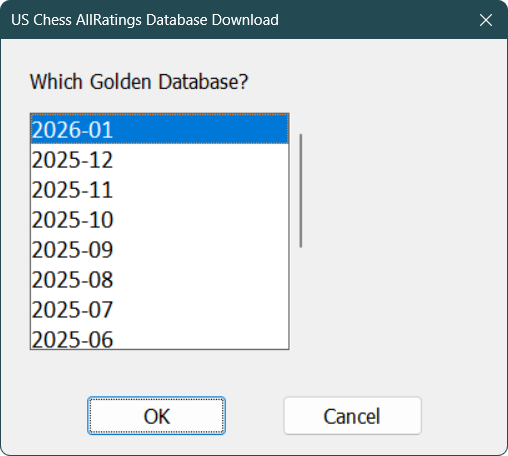
From the scrolling list, you pick the effective date for the supplement. This will not always be the most current one (the one at the top) if your tournament is being based upon an earlier one. Note, also, that the top of this list won't always be available yet—the list always shows next month at the top, though next month's database usually isn't ready until about two thirds of the way through the current month.
An API key is not currently needed to use any of the features supported by WinTD. (The Golden Database download is routed through a link on the Estima web site). You may need it in the future for access to other features. This is only available to US Chess members. To get an API key go to
https://ratings.uschess.org/portal/api-access
If you haven't already done so, you will be prompted to sign in with your US Chess login. Click the New API Key and give the key a name (to identify the key). Use a name without spaces. Copy the key. (There is a copy icon just to the right of the key). Use US Chess>Set/Change API Key and paste the key into text box in the dialog there. You should only have to do this once (per computer), not once per month.
The API key is saved in each computer's registry. So while you can use the same keys on multiple computers, it will probably be simpler to get a separate key for each. Do not make your API key publicly available—if someone using your key is seen as abusing the system, your API key could be disabled.
Manual Download of Golden Database
In a process which was needed from roughly January to September 2026 (and is still available) you can also manually download the "all ratings" database from the ratings site:
https://ratings.uschess.org/portal/published-ratings
If you haven't already done so, you will be prompted to sign in with your US Chess login.
.png)
Pick the month and year you want at the top right of the page. Choose the TSV (Tab-Separated Values) version (not the DBF, which has much less information). Click on the All Ratings download button, which will download a (rather large) text file (typically to your Downloads folder).
Once you have downloaded the file, you can install the database using the US Chess>Install from TSV... menu operation. Select the TSV file that you downloaded when prompted for the file name. WinTD makes a copy of the information (in an easier-to-use form) to your US Chess directory, so you don't have to move the TSV file out of the downloads.
The Golden Database includes both players who have ratings, and those with memberships but who are not yet active.
The US Chess database includes the following information:
1.USCF ID (8 digit number)
2.Name. Very long names might be truncated. WinTD will try very hard to maintain a fuller name, and will warn you if the US Chess names seems to be incompatible with the one that you may already have.
3.Expiration date (maintained as mmyy, with 9999 used for life members)
4.State code (typically two character postal abbreviation and FR for foreign memberships)
5.Over-the-board regular rating
6.Over-the-board quick rating
7.Over-the-board blitz rating
8.On-line regular rating
9.On-line quick rating
10.On-line blitz rating
11.FIDE ID (if known)
12.FIDE Federation (if known)
13.FIDE title (if known)
Copyright © 2026 Thomas Doan