|
Wizards / Unit Root Test Wizard |
This Wizard provides dialog-driven access to eight unit root testing procedures. These procedures are stored on separate files (included with RATS), so in order for this Wizard to work properly, RATS needs to be able to find the corresponding procedure files.
Selecting the Unit Root Test Wizard from the Time Series Menu brings up the following dialog box:
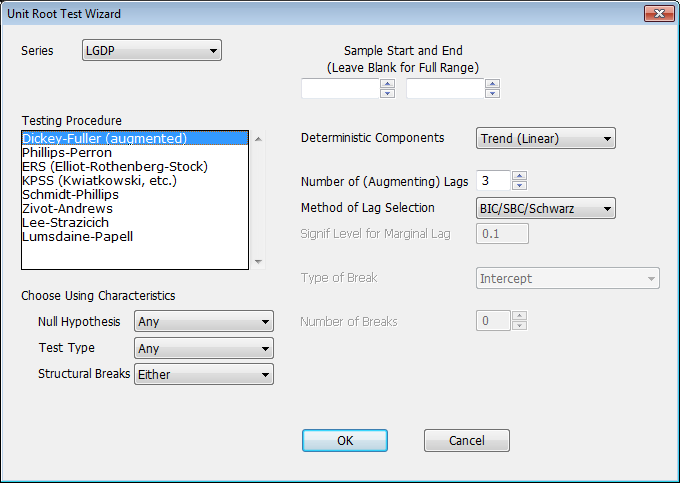
Series
Use this field to select the series you want to test.
Sample Start and End
Use these fields if you want to specify the start and/or end of the sample range. Leave these blank if you want to use the default range.
Testing Procedure
Select the test you want to use from this list.
|
Dickey-Fuller (augmented) |
@DFUNIT procedure. The basic augmenting Dickey-Fuller test. |
|
Phillips-Perron |
@PPUNIT procedure. Uses a non-parametric correction for short-run serial correlation. |
|
ERS (Elliot-Rothenberg-Stock) |
@ERSTEST procedure. Performs a GLS detrending of the data prior to running a unit root test. |
|
KPSS (Kwiatkowski, etc.) |
@KPSS procedure. This is the only one of these that has stationarity as the null hypothesis. |
|
Schmidt-Phillips |
@SPUNIT procedure. This is an LM test, which allows for trends both under the null and the alternative. |
|
Zivot-Andrews |
@ZIVOT procedure. Generalizes the Dickey-Fuller test to allow a break in the trend. |
|
Lee-Strazicich |
@LSUNIT procedure. Generalizes the Schmidt-Phillips test to allow for (one or more) breaks in the trend. |
|
Lumsdaine-Papell |
@LPUNIT procedure. Generalizes the Zivot-Andrews test to allow for more than one break in the trend. |
Choose Using Characteristics
You can use these fields to filter the list of tests shown in the "Testing Procedure" field based on these three criteria: the Null Hypothesis used (unit root, stationarity, or any of the above), the type of test performed (Wald, LM, Fluctation, or any of these), and whether or not the procedure allows for structural breaks (no breaks, one or more breaks, or either).
Deterministic Components
Use this field to select the deterministic term (if any) included in the model. Choices vary depending on the procedure selected, but may include "None", "Constant", and "Trend (Linear)"
Number of (Augmenting) Lags
Where applicable, use this field to select the number of Augmenting or Window lags to be used.
Method of Lag Selection
Where applicable, use this to choose the method used to select the number of lags.
|
Fixed |
Uses the fixed number of lags in the Number of (Augmenting) Lags field |
|
AIC (Akaike) |
Uses the Akaike Information Criterion |
|
BIC/SBC/Schwarz |
Uses the Bayesian Information Criterion (the terms shown are synonyms) |
|
Hannan-Quinn |
Uses the Hannan-Quinn Criterion |
|
General-to-specific |
Uses General-to-Specific lag selection, which means that the maximum lags are tried first. If the final lag of the difference is significant according to the Signif Level for Marginal Lag, then the full set of lags are used. Otherwise, one less lag is examined. Lags are dropped as long as the final one is insignificant. |
Signif Level for Marginal Lag
If you choose "General-to-Specific" for the Method of Lag Selection, this sets the marginal significance level which is used to determine if the last lag is significant.
Type of Break, Number of Breaks
For the procedures that support tests with one or more structural breaks, use these fields to select the type of break and maximum number of breaks.
Copyright © 2026 Thomas A. Doan