


When you select the menu operation Reports-Show Prize Lists..., WinTD displays the following dialog box:
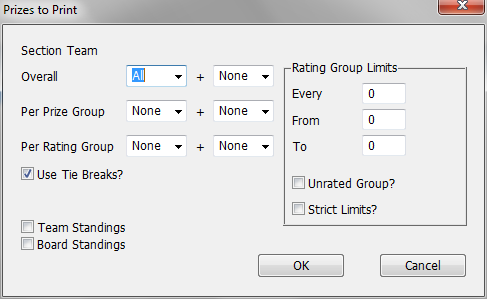
The dialog box fields are described below. If you have more than one section selected when you do this operation, WinTD will bring up separate dialog boxes for each section, and display separate prize lists. When you click on OK, WinTD will generate a new Report Window for each prize list. You can then print the Report Windows using the menu operations Reports-Print Window or Reports-Print Report Windows. See Prize List Examples for more information.
Overall Prizes
The number of overall place prizes to show. The + field allows you to show ties for the final place, that is players who had the same score, but lower tie breaks. These will be listed in a separate Consolation Awards section. If you have other prizes, any player who received a group or rating prize will not be included in the consolation list.
Per Prize Group
The number of prizes per special prize group, as determined by the Prize Group field on the Add/Edit a Player dialog. + Ties will show you any players tying for the final place.
Per Rating Group
The number of prizes per rating group, as you define in the group box on the right side of the dialog box. WinTD does the same number for each group. + Ties will show you any players tying for the final place.
Use Tie Breaks?
Indicates whether to use tie breaks to order the players. If not, all players with the same score will be listed as ties. See tie breakers for information on setting the precedence order for tie breaks.
Team Standings?
Board Standings?
These switches are only available for Team Tournament sections. Turn on Team Standings to get a window showing overall team standings. Use Board Standings to get a window displaying board-by-board individual standings.
Rating Group Limits
Every |
This many points |
From |
The bottom limit |
To |
The top limit. Rating groups which do not include their top boundary. |
For instance, every 200 points from 1400 to 2000 will give groups which go up to (but not including) 1400 points, 1600 points, 1800 points and 2000 points.
Unrated group?
Check if the unrated are to be considered as a separate group.
Strict limits?
Check this if players are only in at most one rating group. For instance, every 200 from 1400 to 2000 with strict limits will give you the groups "Under 1400", "1400-1599", "1600-1799" and "1800-1999". Without strict limits, you will get the groups "Under 1400", "Under 1600", "Under 1800" and "Under 2000".
Notes
Upset prizes are handled with the menu operation Reports-Show Upset Prizes...