


The "Tournament Info" dialog box allows you to set or change the name and date(s) of a tournament. It also allows you to change the order of precedence assigned to the various tie-breaking methods supported by WinTD.
The dialog box appears whenever you create a new tournament using the menu operation File-New Tournament... To view or modify the settings for an existing tournament, just select the menu operation File-Edit Information (the tournament file must be open).
Here is a sample Tournament Info dialog box, with a key to the various fields:
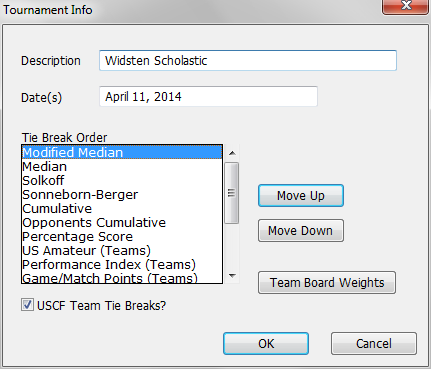
Description
Enter the name or a brief description of the tournament in this text field. This information is used as the title of the Sections Window and on page headers for printed reports.
Date(s)
Enter the date or dates of the tournament here. This is just a text field, so you can enter the dates in any format.
Tie Break
All of the tie break methods supported by WinTD are listed here, in the current order of importance. The method at the top of the list will be used as the first tie break. The next method in the list is used as the next tie breaker, and so on. To change the ordering, select one of the methods by clicking on it. Then click on either the Move Up or Move Down button to move the selected method up or down in the list. See Tie Breakers for technical details on the tie breakers.
Team Board Weights
Click on this button to view or change the weights assigned to each board in a board-weighted team tournament. Note that these settings have no effect on individual, combined, or non-board-weighted team tournaments. The default value is 1.0 for all boards. The Board Weights dialog is rather straightforward.
Board weight information is saved as part of the individual tournament file. If you enter a set of board weights and want to preserve them for use with future tournaments, you can use the Save As Template operation to save the tournament as a template file, which will include the board weight information.
Note that you can only specify weights for up to 12 boards. Teams can have more than 12 boards, but boards 13 and above will always have a weight of 1.0.