


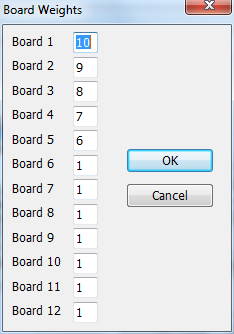
This pops up if you hit the Team Board Weights button on the Tournament Info dialog box. This is only meaningful if you have sections in your tournament that are team vs team with weighted board scores. Set the fields to the desired board weights. Boards that aren't used (here everything from 6 on) can be set to anything. (By default, all will be 1).
Related Topics:
WinTD Help Contents
Team Windows
Team Files
How To: Add Players to a Team
How To: Add Teams to a Team Section
How To: Change Board Orders of a Team
How To: Create a Team Tournament Section
How To: Enter Scores in Team Sections
How To: List Individuals in a Team Section
How To: Show/Print Team Standings (combined tournaments)
How To: Show/Print Team Standings (team tournament)
How To: Use Master Files for Team Tournaments
How To: Use Seedings Not Ratings
Team Tournaments
Dialog Box: Add/Edit a Section
Dialog Box: Add/Edit a Team
Dialog Box: Board Results
Dialog Box: Team Scoresheets
Dialog Box: Team Setup
Samples: Team Pairing Sheets
Samples: Team Standings
WinTD Help Contents
Team Windows
Team Files
How To: Add Players to a Team
How To: Add Teams to a Team Section
How To: Change Board Orders of a Team
How To: Create a Team Tournament Section
How To: Enter Scores in Team Sections
How To: List Individuals in a Team Section
How To: Show/Print Team Standings (combined tournaments)
How To: Show/Print Team Standings (team tournament)
How To: Use Master Files for Team Tournaments
How To: Use Seedings Not Ratings
Team Tournaments
Dialog Box: Add/Edit a Section
Dialog Box: Add/Edit a Team
Dialog Box: Board Results
Dialog Box: Team Scoresheets
Dialog Box: Team Setup
Samples: Team Pairing Sheets
Samples: Team Standings