


With the proper data in place, WinTD can create generate most of the fields for a FIDE rating report. This is a specially formatted text file. Please note that you need to coordinate this with the USCF office, since all players need to have a FIDE ID.
The following is required as preparation:
- Make sure that all games that are FIDE ratable are tagged as such. If all games in a section are played under ratable conditions, the simplest way to see that this gets done is to have the FIDE Ratable tag set for the section (Add/Edit a Section Dialog Box) from the start of the tournament. If this was not done, so all games are currently tagged as non-ratable, the simplest way to fix this is to select the section, then do Section-List Players. Select all the players, then do Players-List Games. This will give you a list of all the games in the section. Do Select All on the game list, and then do FIDE-Mark as FIDE Ratable. If you have multiple schedules merging into a final section, and some of the schedules aren't FIDE ratable, make sure the FIDE Ratable tag is off in the feeder sections with non-ratable schedules and on in the sections with ratable schedules, and merge the non-ratable schedules into the ratable one. If you make a mistake and set all schedules as FIDE ratable, you will have to go back and locate the games which shouldn't have been ratable, and do FIDE-Mark as not FIDE Ratable. (They are typically easy to find if you use different sets of board numbers for the different schedules). Note that games are tagged as ratable based upon the setting of the rating tag when those games are paired, so be careful to get the tags set properly from before you pair round one.
- ID field should have the USCF ID codes. The report generator will get the FIDE ID from the USCF's record.
- FIDE also has a M/W code for the player's sex. WinTD pulls this information from the type field in the player's record. You might want to check that you have this set correctly for the women. (The records will generally be set as "male" by default.)
Once you're ready, do FIDE-Make FIDE Report. This will pop up a "FIDE Tournament Export" dialog as shown below:
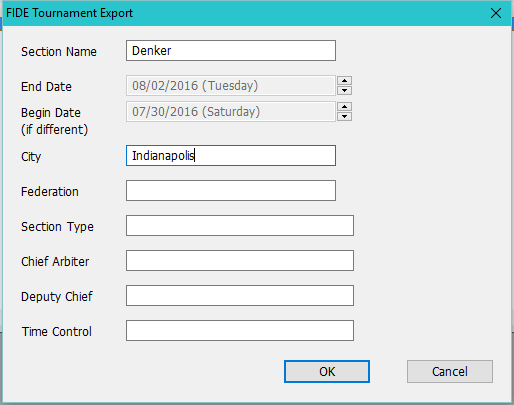
Each selected section will generate a separate file.
Section Name
This will be initialized with the name of the section. You can edit it to include a more descriptive name of the tournament and section.
End Date
Begin Date
Use the spin buttons to set the ending and starting dates.
City
Location of the tournament.
Federation
Sponsoring FIDE federation for tournament.
Section Type
Description such as Individual Swiss, Round Robin, Team Swiss, etc.
Chief Arbiter
Deputy Chief
Show the arbiters.
Time Control
Enter the time control.