


The "Add/Edit a Section" dialog box appears whenever you add a new section (by selecting the menu operation Section-Add), or double click on an existing section in the Sections Window.
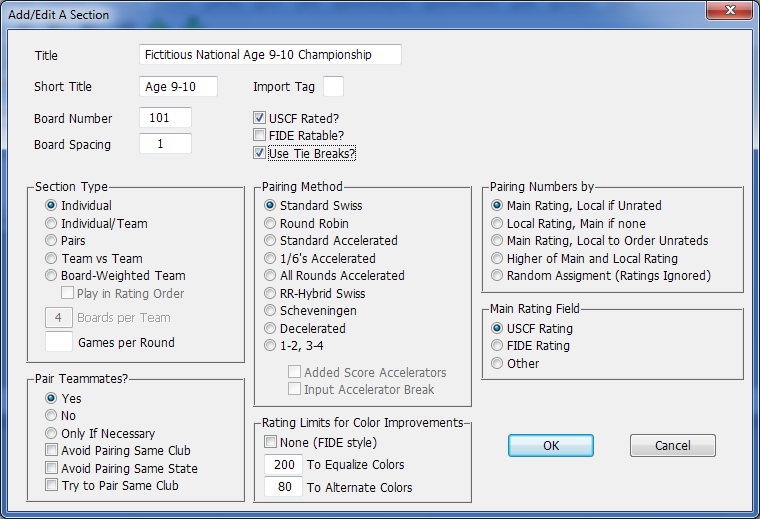
The dialog box has the following fields:
Title
This is the long title which will be displayed on reports. For instance, "Fictitious National Age 9-10 Championship"
Short Title
An abbreviated title (up to 10 characters) which will appear in the section field of the Add a Player dialog box. For instance, "Age 9-10."
Board Number
The number assigned to the first board in this section. For a small tournament where the TD announces the pairings, just start at board number 1. See How To: Assign Board Numbers for details.
Board Spacing
The value by which board numbers will be incremented. The default is 1.
USCF Rated?
This matters only if you are going to be using WinTD to prepare a ratings report to send to the USCF.
FIDE Ratable?
This indicates whether the games in this section are being played under conditions which are FIDE ratable. This matters only if you are going to be using WinTD to prepare a ratings report to send to FIDE.
Use Tie Breaks?
Controls whether or not tie break information will be computed when you do Section-Update Scores/Standings. This choice will be reflected when you sort by or show the standings in Player windows.
Section Type
Select from Individual, Individual/Team, Pairs, Team vs Team, and Board-Weighted Team. See Team Tournaments for details on the various types of team tournaments supported by WinTD.
Boards per Team
For team sections, use this field to specify the number of boards per team. For individual/team tournaments, it's the number of top scores which count for team results.
Games Per Round
For tournaments in which players play each other more than once per round, enter the number of games per round in this field. Leave it blank for the default case of one game per round. See multiple game tournaments for more information. Note that you can only specify multiple games per round for individual or combined individual/team sections--this feature is not supported for team (or board-weighted team) sections.
Pairing Method
This section allows you to choose from the following pairing methods:
Standard Swiss
The standard Swiss System pairing system, according to USCF rules. See Pairing System for details.
Round Robin
Select this option to use a Round Robin pairing scheme rather than the Swiss System. You cannot switch to Round Robin after pairing a round.
Standard Accelerated
1/6's Accelerated
All Rounds Accelerated
These are all accelerated variations of the standard Swiss System. Accelerated pairings violate the basic Swiss System principles for the first two rounds in an attempt to reduce the number of perfect scores. They also tend to reduce the number of early round mismatches. See Pairing System: Accelerated Pairings for details on the choices.
RR-Hybrid Swiss
In round one, this pairs as a Swiss, but after that, takes pairings from a Round Robin table with the "round" determined at least in part by Swiss principles. This is useful when the number of players in a section is too large for a regular round robin, and too small for a standard Swiss to work effectively. See Pairing System: Alternative Methods and Pairing System: Small Tournaments.
Scheveningen
Scheveningen is a special pairing system where the players are divided into two teams, and all on one team play all on the other. See Pairing System: Alternative Methods.
Decelerated
This is designed to delay, rather than accelerate, pairing the top players. It's designed to be used in a Swiss when the number of players is too small relative to the number of rounds. See Pairing System: Alternative Methods and Pairing System: Small Tournaments.
1-2, 3-4
In round one, this pairs the highest ranked player with the second highest, continuing like that, and does similar pairings in subsequent rounds. See Pairing System: Alternative Methods.
Added Score Accelerators
Input Accelerator Break
These check boxes will be available if one of the accelerated pairing systems is selected. The first chooses between added score accelerators (high ranking players are treated, for pairing purposes, as if they have extra points),
Pair Teammates?
If you choose Yes, the Team identification for players will be ignored and there will be no restrictions on pairing teammates. If No, players with the same Team ID will never be paired. (Exception: in a tournament with a very small number of players, it is possible that a player has no one other than a teammate left to play.) If you choose Only if Necessary, WinTD will try to pair a section without pairing teammates, but it will not shift players out of a score group just to avoid pairing teammates. See Pairing System: Teams and Clubs for details.
Avoid Pairing Same Club?
This can be used with or without the teammate preferences. For this, also see Pairing System: Teams and Clubs.
Avoid Pairing Same State?
This can be used with or without the teammate preferences. This avoids pairing players from the same state, but will pair them if the alternative is to pair the players out of score group.
Try to Pair Same Club?
This can be used if you have a reason to try to pair people (in the same score group) who fall into certain categories (perhaps eligibility for a prize). The identifying information needs to be put into the club field.
Pairing Numbers by
See Local Ratings for a description of local ratings. For a USCF rated tournament, you can use "Main Rating, Local if Unrated", "Main Rating, Local to Order Unrated", or "Higher of Main and Local Rating." See Pairing Numbers for details.
Main Rating Field
Specify whether you are using USCF or FIDE ratings (or "Other") as the Main ratings for the section.
Rating Limits for Color Improvements
USCF pairing rules allow a certain amount of flexibility for altering pairings to improve colors: either to achieve equalization (same number of Blacks as Whites) or alternation (Black and White in alternate rounds). The usual settings in a USCF tournament (and the default values in WinTD) are 200 for equalization and 80 for alternation. If you clear these fields (the easiest way is to double-click and hit a backspace or <Del> key), WinTD will make whatever changes are necessary within a score group to minimize the number of players receiving the wrong color. (This is identical to what you get by checking the None (FIDE style) box.
The "Color Allocation Rules" section in the "Pairing Rules" tab of the Preferences dialog box gives you some additional options to control what WinTD will be allowed to do to improve colors. See Pairing System: Color Corrections for more information.
Turn on the None (FIDE style) check box if you WinTD is allowed to make any size switch in order to correct colors. It will still try to keep the switches as small as possible.
WinTD Help Contents
Team Windows
Team Files
How To: Add Players to a Team
How To: Add Teams to a Team Section
How To: Assign Board Numbers
How To: Change Board Orders of a Team
How To: Create a Team Tournament Section
How To: Enter Scores in Team Sections
How To: List Individuals in a Team Section
How To: Manage a Master File
How To: Run a Round Robin Tournament
How To: Show/Print Team Standings (combined tournaments)
How To: Show/Print Team Standings (team tournament)
How To: Use Master Files for Team Tournaments
How To: Use Seedings Not Ratings
Pairing System: Accelerated Pairings
Pairing System: Pairing Numbers
Pairing System: Round Robin Pairings
Local Ratings
Team Tournaments
Dialog Box: Accelerator Break
Dialog Box: Add/Edit a Team
Dialog Box: Assign Board Numbers
Dialog Box: Board Results
Dialog Box: Board Weights
Dialog Box: Manual Pairing Numbers
Dialog Box: Team Scoresheets
Dialog Box: Team Setup
Samples: Team Pairing Sheets
Samples: Team Standings