Dialog Box: Choose Active Entry |
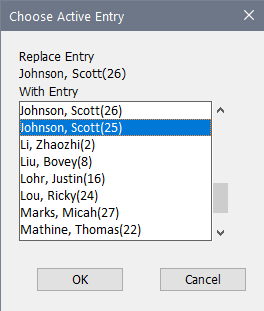
The Choose Active Entry dialog is popped up when you do the Players>Choose Active Entry operation. This is used in the (rare) occasion that you merge two sections when a player can play in two sections simultaneously. (Most re-entries require a player to drop out of one schedule to enter another). If the player has two active entries at the time of the merge, you need to pick which one to use for the remainder of the tournament. If you just withdraw the entry that you are dropping, it's possible for an opponent to who played against that entry to be paired again—Choose Active Entry will both withdraw the entry and connect the two entries so this wouldn't happen.
Note that this will show both the original entries. You choose the entry that you are withdrawing in the Players Window; in this dialog, you will choose the entry that will be used in the remainder of the tournament.
Copyright © 2026 Thomas Doan