|
Wizards / Function Lookup Wizard |
The Function Lookup Wizard provides an easy way to browse through all of the functions available in RATS. You can check the syntax of the function, and even use dialog boxes to enter values for the arguments, check your syntax, and paste the completed function into your program code.
To access the RATS function wizard, just click on the "Function" toolbar icon:  or select the menu operation View>Standard Functions....
This brings up the Function Lookup dialog box:
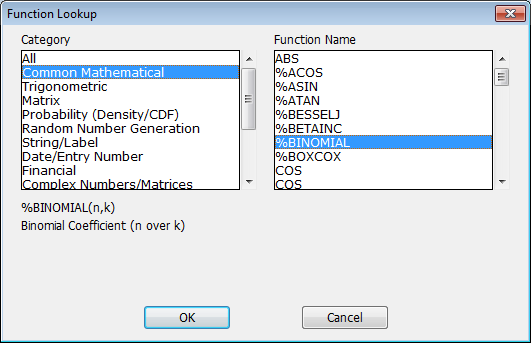
This dialog box provides a convenient way to view/use all of the built-in functions available in RATS. When the Category field on the left is set to "All", the Function Name field on the right displays all functions available in RATS. If you select a category, such as "Common Mathematical", the display on the right will shown only those functions related to that category. If you click on a function in the right hand column, the dialog box will display the syntax and a brief description of that function. Here, we've selected %BINOMIAL.
If you have a function selected and click on OK, RATS will display another dialog box like the following:
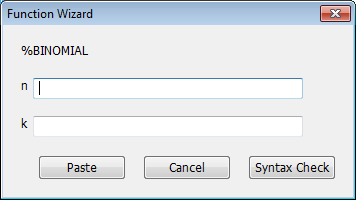
This shows you all of the arguments for the function, with descriptive labels. If desired, you can enter values for any or all of these arguments. If you click on Syntax Check, RATS will parse the values or expressions you provide to make sure their syntax is valid. You can then click Paste if you want to paste the function (including any arguments you have provided) into the current text window.
Copyright © 2026 Thomas A. Doan