


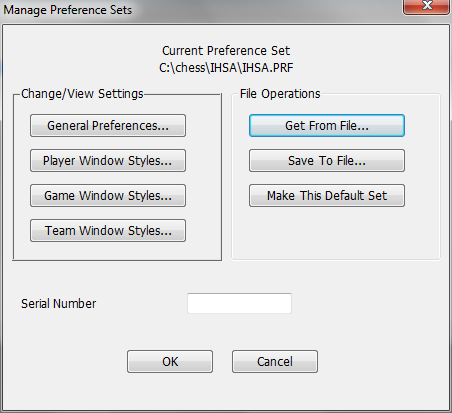
WinTD has a very large number of "preference" items which determine how pairings are computing and how reports are displayed. Different types of tournaments call for different settings for these. The Manage Preference Sets dialog (brought up by the Manage Preference Sets operation on the File menu on Windows or the WinTDOSX menu on the Mac) lets you create, edit and switch which of these is governing your tournament.
General Preferences
This pops up the multi-tabbed Preferences Dialog which handles most of the preference information.
Player Window Styles...
This pops up the Change Layout Dialogwhich lets you (re)define Player Window styles. All that matters for preference purposes are any changes that you make to the defined styles.
Game Window Styles...
This pops up the Change Layout Dialogwhich lets you (re)define Game Window styles. All that matters for preference purposes are any changes that you make to the defined styles.
Team Window Styles...
This pops up the Change Layout Dialogwhich lets you (re)define Team Window styles. All that matters for preference purposes are any changes that you make to the defined styles.
Get From File...
Loads preferences from an existing file.
Save To File...
Saves preferences to a new or existing file. We use a .PRF extension for preference files.
Make This Default Set
If you push this button, the current preference file becomes the default that gets opened when you re-start the program.