Getting Started: Using the FIDE Database |
Because the full worked example wasn't done with real players, we couldn't pull their information out of the FIDE database. In general, the only difference is in the phase of adding the players.
Before you do this, you must first have the FIDE database installed on your computer.
Step 1: You need to point WinTD towards the directory which will hold the database—this is done with the FIDE>FIDE Data Directory... operation. You can put this in the same directory as the US Chess data (if you need that) or a different one; it doesn't really matter.
Step 2: Download the database using FIDE>Download FIDE Database...
Note that we have a sample tournament called SampleFIDE.ptoz which has the tournament and section already set up—if you want to skip those steps, open that file and go to Step 5.
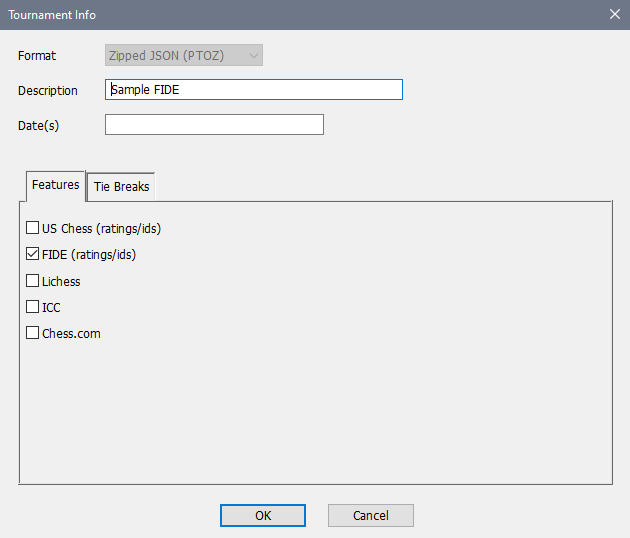
Step 3: Create a tournament including the FIDE (ratings/IDs) features:
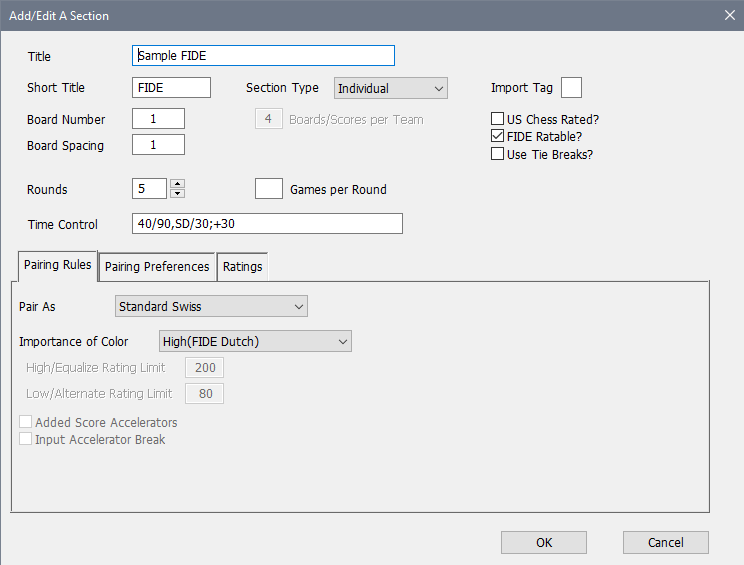
Step 4: Create a section. We're making this a 5 round Swiss using the FIDE Dutch System. In the header, we provide a Title and Short Title, change the Board Number to 1, Rounds to 5, and input the Time Control. In the top right, we check the FIDE Ratable? box.
In the Pairing Rules tab, we choose "Standard Swiss" in the Pair As box and "High (FIDE Dutch)" for the Importance of Color. Choosing FIDE Dutch disables the two rating limit boxes since the FIDE Dutch system has a set method for determining corrections which doesn't depend upon the differences in ratings.
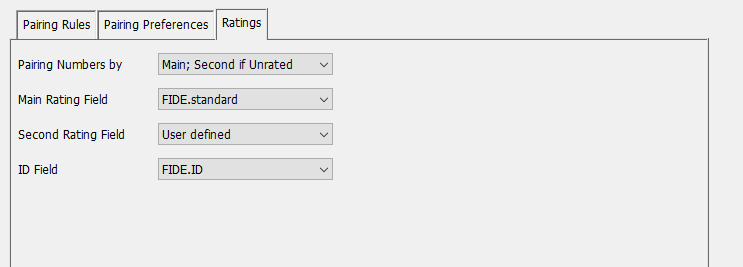
Now switch to the Ratings tab and change the Main Rating Field to "FIDE.standard" and ID Field to "FIDE.ID":
Step 5. We will enter the following three players:
|
Carlsen, Magnus |
1503014 |
|
Caruana, Fabiano |
2020009 |
|
Nepomniachtchi, Ian |
4168119 |
We'll show several ways to do this.
Step 5—Using Name: Select the Players>Add a Player... operation. Type "Carlsen" into the Name field, open the FIDE Database tab, and push the Lookup button. This will point the database to the first match with "Carlsen". Because "Carlsen" is a fairly common name, "Carlsen, Magnus" is not on the first page, but you can scroll down to find it. You can improve the lookup on a common name by adding the start of the first name as well: "Carlsen, M" (note the space after the ,).
Double click on the "Carlsen, Magnus" line and the current FIDE information (ID, rating, federation and title) will be copied into the header (the rating you get will almost certainly be different since you will be using a different version of the database).
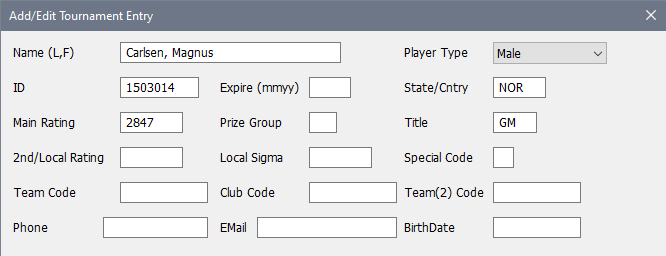
Note that only a handful of fields will be filled in off the FIDE database. For this tournament, we won't need anything else, but in other tournaments, you might want to fill in things like the Phone and EMail. When you are finished with any of the additional information, click the OK at the bottom which adds the player to the tournament.
Note well that there may also be important information in the Tournament Info tab—for instance, that's where the Assign Byes button is if you need to process bye requests and if you are running a tournament with multiple sections, that's where the scroll box is for choosing the section for the players, so you may need to also open that before you OK an entry just to make sure it's correct.
Step 5—Using ID: The ID is generally a more useful piece of information since there is one and only one person with a given ID. To search by ID, leave the name field blank and put the ID you were given into the ID field, so here "2020009" for Caruana. On the FIDE Database tab, again do Lookup. This will switch the Sort by to "ID" and move the scroll to the ID that you entered:
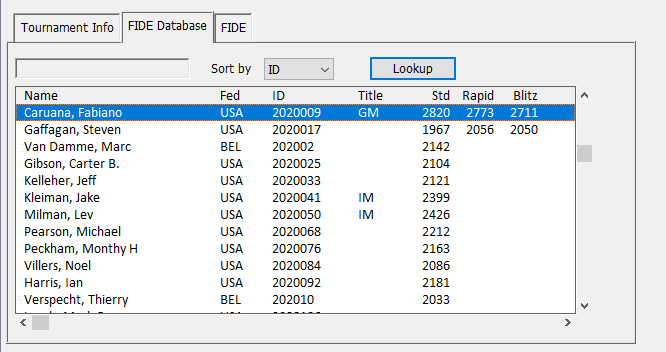
Note that it sorts the IDs as character strings, not as numbers, so 202002 is mixed in with the seven digit strings. Double-click on Caruana's line and the current information will be copied into the header:
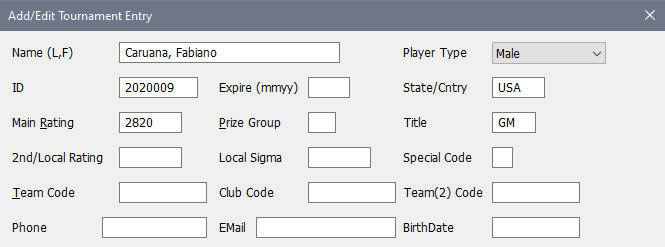
After adding any other information you might need, click OK to enter Caruana into the tournament.
Step 5—Using Type Buffer: An alternative is to go directly to the Lookup button without filling anything in (or you can single-click anywhere in the FIDE Database scroll box), and start typing. This usually makes the most sense when you are searching by name. Change the Sort by to "Name" (since the last lookup was by "ID", we need to change that back to "Name"). If you start typing "Nepo", you will see the scroll box move first to the first N, then the first name that starts with Ne, .... After "Nepo" you would get something like
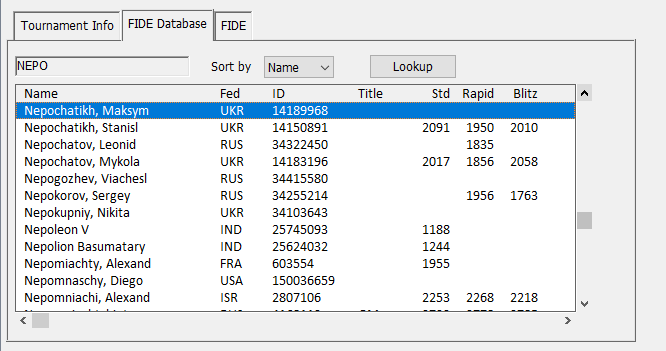
If you scroll down to the next page, you'll find the desired player. Double click on the entry and the header information will be filled in:
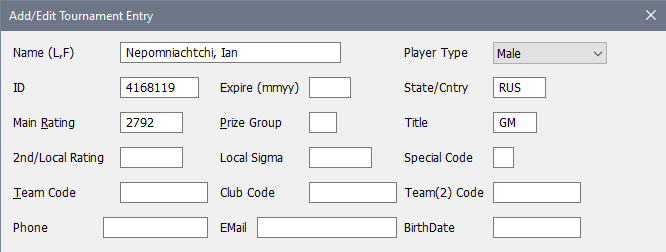
Step 6: The above will put the players into the tournament using the version of the database which was available at the time that you put the entries in. It's possible that you will be putting the entries in as you get them, but the actual run date of the tournament would require updated ratings. To do that, before the tournament, get the updated version of the database (just repeat Step 2), open the tournament, get a player's list, select all the players and do FIDE>Update From Database. That will replace the ratings, Title and State/Cntry fields with whatever are the now current values on the database.
Copyright © 2026 Thomas Doan