How To: Import Master Player Data |
The operation Master(Player)>Import Data File... allows you to import a list of players from a text or spreadsheet file into a Master Player file. In order for WinTD to import the data correctly, the source files must meet the following requirements:
1.Text files can be comma- or tab-delimited. Spreadsheets can be in Excel XLS or XLSX or Lotus WKS formats. DBF (dBase) files are also permitted. You can have multiple worksheets in a single spreadsheet and can choose which to use for input, but that sheet must satisfy the restrictions below.
2.The source file should be organized with one player per row.
3.The first row of the file must consist of labels identifying the type of information provided by each column, and these labels must match the field names or one of its aliases as listed in Import Fields. (You can have extra fields for your own use which won't be imported).
A sample spreadsheet is show below: this includes Name, (US Chess) ID, FIDE ID, State, Grade and player type.
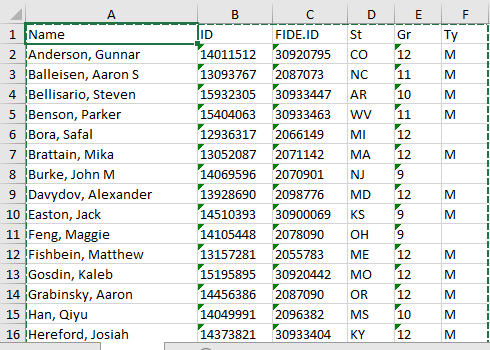
Once you have a source file ready, just do the following:
1.Open or create a Master Player file.
2.Select the Master(Player)>Import Data File... operation. Choose the file format and file name. WinTD will then pop up the Select Import Fields dialog. Follow that link for the remaining instructions. Note that the Tournament-Specific Information will be disabled in that dialog.
Copyright © 2026 Thomas Doan