


The "USCF Database Update" dialog box comes up when you do the USCF-Update From Database operation on either a Players Window or a Master Player Window. This gives you an option as to which rating on the database will be used:
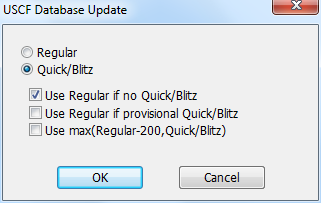
Regular
Quick/Blitz
Regular chooses the regular ratings, Quick/Blitz chooses whichever of the Quick/Blitz ratings you downloaded. The three checkboxes shown only appear if you choose Quick/Blitz.
Use Regular if no Quick/Blitz
Use Regular if no provisional Quick/Blitz
Use max(Regular-200,Quick/Blitz)
This lets you choose how to handle Quick/Blitz ratings that are absent, only provisional, or simply quite low relative to regular ratings. Since they are check boxes, you can choose any or all of them.