


The USCF "Golden" database can be downloaded from the "tournament directors" area on the federation's web site. At this time, they are produced monthly, and are typically available about 10 days before the start of the month in which they take effect.
WinTD uses the database in two ways:
- You can look up player's ratings and expiration dates when adding them to a tournament or master player file. Just use the From USCF button or the USCF Database tab in the Add/Edit a Player Dialog.
- You can automatically update the ratings and expiration dates on a master player file or on a tournament file. See How To: Update Players' USCF Ratings.
Before you can use the rating database with WinTD, you need to tell the program where to find the information. Do this with the USCF-USCF Directory... operation. This pops up a dialog box asking you to specify the directory containing the USCF files. By default, this is (under Windows) C:\TNMTADMT which is where it was saved historically.
You can download the full USCF "Golden Database" using the USCF-Download USCF Database... operation. This will pop up a dialog box such as:
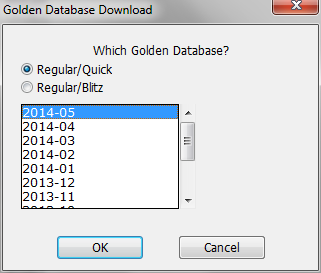
From the scrolling list, you pick the effective date for the supplement. This will not always be the most current one (the one at the top) if your tournament is being based upon an earlier one. Note, also, that the top of this list won't always be available yet---the list always shows next month at the top, though next month's database usually isn't ready until about two thirds of the way through the month.
At this point, the USCF database doesn't include all three ratings (regular, quick and blitz) on a single database, so you have to choose whether you want Quick or Blitz as the secondary rating. This is done by picking the radio button at the top.
The Golden Database includes both players who have ratings, and those with memberships but who are not yet active.