Dialog Box: Master Player Setup |
This is used to set up a new master player file (Master(Player)>New) or view/edit the set up of an existing master player file (Master(Player)>Edit Setup).
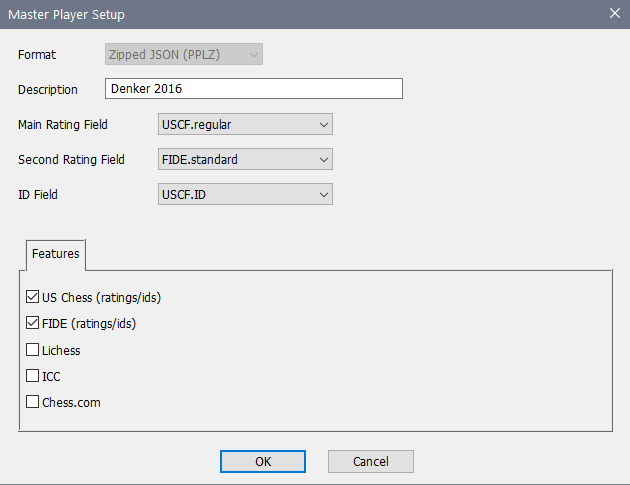
Format
For a new file, you will be given a choice between the new zipped JSON format (pplz) and the older legacy format (ppl). We strongly recommend that you use the newer one for any new files. For an existing file, this is disabled—you cannot change the format through this operation. If you want to copy a old format file to the new format, open the old file, do File>Save As and pick the new format for the target.
Description
This is a free-form description of what the file is.
Main Rating Field
A master file includes two general rating fields: a Main Rating and a Second Rating. You can use the Main Rating Field popup to choose which rating is to be used for the main rating in this file. Note that this is not as important as the similar choice in a tournament section, where the ratings are actually used in running the tournament.
In general, your available choices depend upon the Features (see below) that you have selected. For instance, here the player file is including both US Chess and FIDE data, so you can choose any of the six US Chess ratings and three FIDE ratings. In addition, there will always be the option of "User Defined" which means that it isn't filled in or changed automatically when you update the other data.
Second Rating Field
You can use the Second Rating Field popup to choose which rating is to be used for the second/local rating in this file. If you are setting up and maintaining a system of local ratings, this should be set to the default of "User Defined".
ID Field
Use this to determine what the ID field within the file means. As with the ratings, which choices are available depends upon which Features you are including.
Features Tab
This is not available when you are using the old format. This allows you to choose which features (if any) will be included in this file. This controls only what specialized data WinTD will keep. There is no particular harm in choosing features that you aren't actually going to use, but adding features does make the Add/Edit a Player dialog box more complicated by adding tabs for the additional data.
You might want to pick these first, as the list of available choices for the Main Rating Field, Second Rating Field and ID Field all depend upon which features you are including.
Copyright © 2026 Thomas Doan