Dialog Box: Change Common Info (Players, Master) |
This dialog box is brought up when you do the Edit>Change Common Info... operation when either a Player window or a Master(Player) window is open.
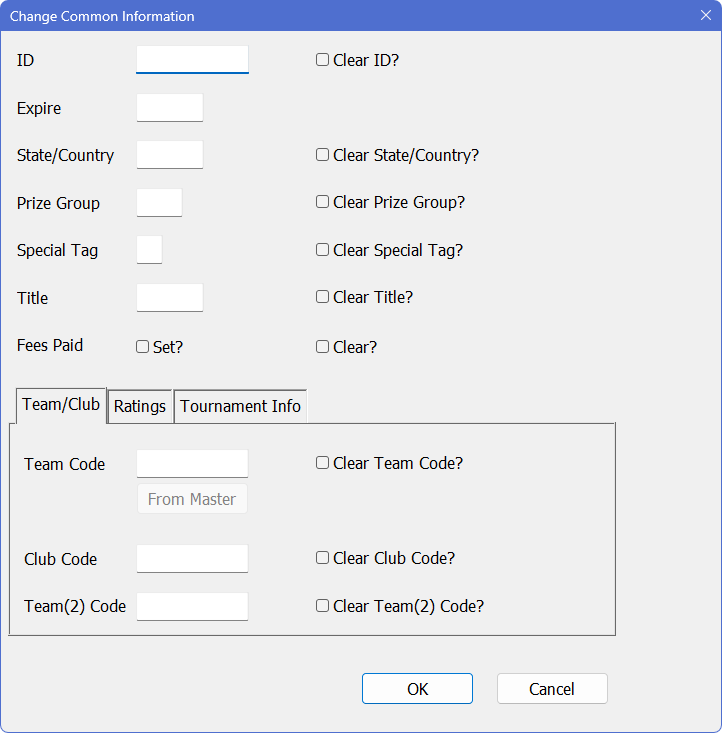
This allows you to quickly change the contents of various information fields for all the selected players. Any information you supply here will be copied to all of the selected player records when you click on OK. For fields which are left blank, no changes will be made to the corresponding player records. If you turn on the Clear... switch for any of these fields, the corresponding fields in each selected player record will be cleared out (erased and left blank) when you click on OK.
For example, you can set the State/Country field for players for whom it is blank by sorting the window on "State/Country" (with Edit>Change Layout). The blanks will be grouped together. Select all of those players, and do Edit>Change Common Info. Fill in the desired state or country code in the State/Country field above and click OK.
The individual fields are described below:
ID
Clear ID?
Expire
For players who have purchased a US Chess membership at this tournament, you can simplify your record keeping by putting in your affiliate ID for the US Chess ID and the current month for the expiration. WinTD will never print the affiliate ID in any of the reports (it's easy to tell the difference: regular ID's are eight digits, the affiliate ID's are a letter followed by seven digits), but the players assigned such an ID (and given a expiration date) will no longer be listed as non-members.
Turning on Clear ID sets to blank both the ID's and expiration dates for all the players chosen.
State/Country
Clear State/Country?
This allows you to set or change the state/country field (at most three characters) for all selected players. Clear State/Country sets to blanks the State/Country field for all the players selected.
Prize Group
Clear Prize Group?
This allows you to set or change the prize group field for all selected players. Clear Prize Group sets to blanks the Prize Group fields for all the players selected.
Special Tag
Clear Special Tag?
This allows you to set or change the "special" (single character) added tag for classifying players. Clear Special Tag sets to blanks the special fields for all the players selected.
Title
Clear Title?
This allows you to set or change the Title field for all selected players. Clear Title sets to blanks the Title field for all the players selected.
Fees Paid (only for Players Windows, not Master Player Windows)
Set all players selected will be changed to show them having paid their fees.
Clear changes them to show them still owing fees.
.png)
Team Code
Clear Team Code?
From Master (only if you have a Team Window open)
If you put any information into the Team Code field, all players selected will have their Team Code changed to that. From Master will pop up a dialog with the current list of team names from the open Team Window. See Team and Club Codes. Clear Team Code sets to blanks the Team Codes for all the players selected.
Club Code
Clear Club Code?
If you put any information in the Club Code field, all players selected will have their Club Code changed to that. Clear Club Code sets to blanks the Club Codes for all the players selected. See Team and Club Codes.
Team (2) Code
Clear Team(2) Code?
If you put any information in the Team(2) Code field, all players selected will have their secondary Team Code changed to that. Clear Team(2) Code sets to blanks the secondary Team Codes for all the players selected. See Team and Club Codes.
.png)
Main Rating
Clear Main Rating?
If you put a value into the Main Rating box, all players selected will have that information changed. Clear Main Rating eliminates the main rating information for the selected players (that is, makes them all unrated).
Second/Local Rating
Clear Second/Local Rating?
If you put a value into the Second/Local Rating box, all players selected will have that information changed. Clear Second/Local Rating eliminates that rating information for the selected players (that is, makes them all unrated).
Local Sigma
Clear Local Sigma?
If you put a value into the Local Sigma box, all players selected will have that information changed. (The Local Sigma is used in the 2P rating formulas to measure how imprecise the current estimate of the rating is for a player). Clear Local Sigma eliminates the local sigma information for the selected players. See Local Ratings for details.
Tournament Info Tab (if the player list is from a tournament)
.png)
Prize Money Limit
Clear Values?
If non-zero, the Prize Money Limit will provide an upper bound on the amount of money that this player can win. Clear Values will make return the value on the default of no limit.
Prize Money Won
Clear Values?
If you put a value into the Prize Money Won field, all layers selected will have that field set to the input value. Clear Values will zero out the money won field for the selected players.
Prize Description
Clear Descriptions?
If you put information into Prize Description box, all players selected will have that information changed. Clear Description clears the field for the selected players.
Pre-Tournament Pts
Clear Values?
If you want to "seed" in a certain number of points (perhaps from an earlier competition) that will be credited to this tournament for scoring purposes, you can put that in here. Clear Values will zero out the pre-tournament points field for the selected players.
Copyright © 2026 Thomas Doan