Dialog Box: Manual Pairing |
The Section>Enter Manual Pairing... operation allows you to pair players manually. When you select Enter Manual Pairing..., WinTD displays the "Manual Pairing" dialog box:
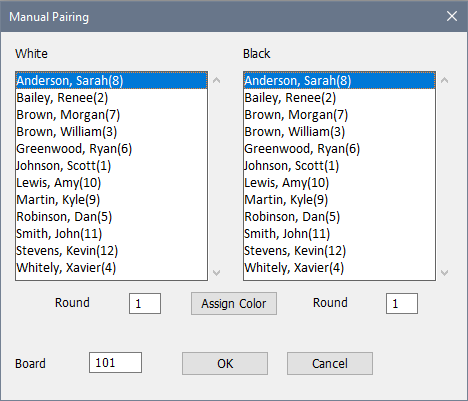
The dialog box displays an alphabetical list of all of the players in the section in both the "White" column and the "Black" column. To pair two players, select the player for white from the left column, and the player for black from the right column. If necessary, change the round or board numbers. Click on OK to pair the two players. See How To: Pair Players Manually for further details.
If you want WinTD to choose the colors, just pick one player from each column and make sure that the "Round" fields are set correctly for both players. Then click on the "Assign Colors" button. The program will swap the colors if needed. Color assignments are handled using the usual pairing algorithms (Pairing System: Assigning Colors).
Cross Round Pairings
The Manual Pairing dialog box allows you to do cross-round pairings, by simply specifying the appropriate (differing) round numbers in "Round" fields. For example, if you wanted to pair a game between Brown and Lewis, with the game being a Round 3 game for Brown and a Round 4 game for Lewis, just select Brown on one side and enter "3" in the "Round" field on that side, and select Lewis on the other side, entering "4" in the "Round" field on that side.
There are several ways to enter results for a cross-round game. If you display a Games Window for either round involved in the game (using, for example, Section>List Games-Specific Round...), the cross-round game will appear in the window and you can enter the game results using the dialog box or quick-keys method. The easiest way to enter results, however, is probably to display a Players window and select the cross-table style using Edit>Change Layout. This will display all the games for all the players. From here, you can just double-click on the game from either player's list and enter the result using the dialog box.
Cross Section Pairings
You cannot use the manual pairing dialog box to pair players who are currently in different sections. For "cross section" pairings, you will have to add a "copy" of one of the players to the other's section. See Cross Section Pairings for more information.
Copyright © 2026 Thomas Doan