How To: Manage a Master File |
If you, or your organization, are running a sequence of tournaments with a similar pool of participants, it's helpful to maintain a single master file so you and your TD's can avoid having to re-enter basic information tournament after tournament. Among other things, you can assign "local" ID numbers to players who do not have US Chess ID or FIDE ID's and you can compute your own local ratings.
If you don't already have a master file set up, it's usually best to run the tournament first, and (in general) once you have the master file set up, it's usually best to put all new players into the tournament itself first and update the master file later. The simple reason for that is that mistakes or missing information for new players will generally be fixed during the course of the tournament, so the information is likely to be cleaner at that point then it is if the master file is used as the point of original entry.
Starting Your Master File
At this point, we assume that you have a finished tournament file and an empty master file. If you have an existing master file, skip to the next step. Create a Master Player file using Master(Player)>New Master List... Make a list of all the players in your tournament. Edit>Select All and drag-and-drop them onto your Master Player window. If you want, you can now Generate Local ID's or Compute Local Ratings as described below.
Updating from a New Tournament
We now assume that you have a second tournament that you've run that used the information from the master file that was created in the first step (through that isn't necessary⎯it could have been run independently of the master file information). Open your Master File using Master(Player)>Open Master List... Open your tournament and again make a list of all the players. Make that Players Window the active window. For instance, this is part of the list of the participants at the 2013 National High School Girls' Invitational.
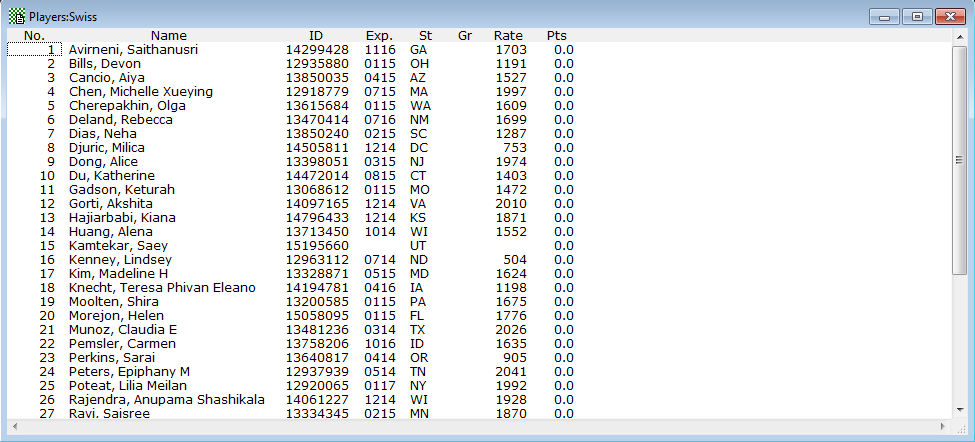
Choose the Players>Coordinate with Master File operation. (You can only do this if the Players window is the active one). This will compare the records of the players in the Players window with those in the Master File, eliminating from the list anyone who is already on the Master file. The master list we are using had the participants in the High School sections at the 2013 SuperNationals so there's at least some overlap. The new Players window is
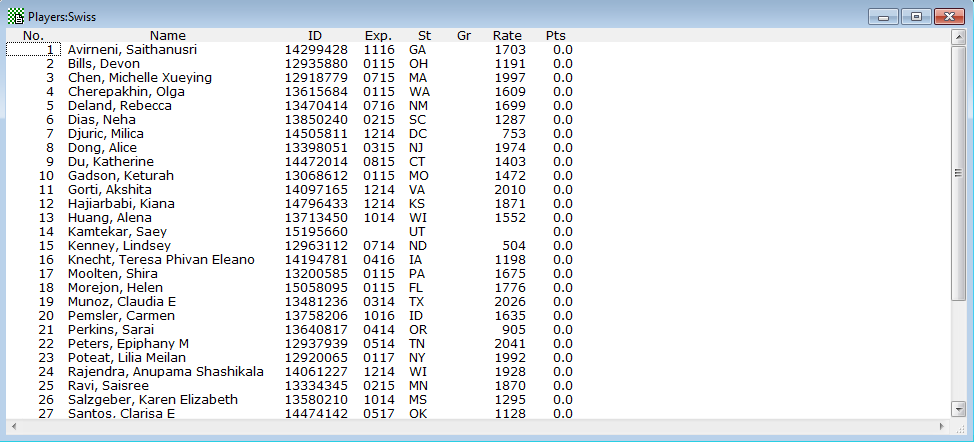
which has at least a few less members than the original (Aiya Cancio, for instance, played in both). You can now Edit>Select All and drag-and-drop over to your Master Player window to add these players to the list.
If all the players have ID's, then this will work almost perfectly as the main determinant of whether a player is already in the Master File is a match on the ID. If many of the players don't have ID's, then the match algorithm tries to do the best it can to identify names. If the name is an exact match or almost so (perhaps a missing initial), it will be treated as a match to the master name. However, it's possible for one person to be listed in the two files using names which are sufficiently different that it isn't clear that they are the same person (due to nicknames or Anglicized vs given names). In that case, the coordination step will leave the player's name in the window. If you cursor to a person in the Player Window, the cursor in the Master Player window to which you're coordinating will move to the "closest" match that it can find. For instance, the closest match to "Djuric, Milica" from DC, is "Djukic, Slavisa" from IL. Needless to say, those aren't the same person. You can typically cursor through fairly quickly before doing the drag-and-drop to verify that you won't be adding duplicates. Again, if you have ID's, you likely don't have to worry about this.
Generate Local ID's
If players have ID's, it's probably a good idea to use them on your master file, so you can keep track of their US Chess or FIDE information. However, if you're running unrated tournaments or tournaments with both rated and unrated sections, it's helpful to have an alternative which doesn't conflict with US or FIDE ID's but which still uniquely identifies each player. You can do that with the Master(Player)>Generate Local ID's operation. The "non-conflicting" ID's are a letter (which you assign) followed by seven digits.
Decide what letter you want to use as a prefix. Open your Master file. Then do Master(Player)>Generate Local ID's. Something like the following will pop up:
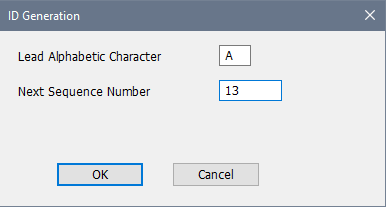
WinTD scans the file looking for the existing non-standard ID's. The Next Sequence Number is the next value up from the highest numerical suffix that it finds. Note, by the way, that if you switch Lead Alphabetic Character, it will still keep the same sequence number. After you OK, it will run through the Master file and assign generated ID's (in this case starting with A0000013 and incrementing from there) to the players with empty ID fields.
Update From (US Chess) Database
This is an operation on the US Chess menu. For any player with a US Chess ID, it checks for the matching record on the US Chess database and updates the ratings. It will also update the expiration date (if the database information is later than what you have) and state. Note that if there seems to be a possible error with an ID because the database name doesn't appear to match, you will be prompted whether to go ahead and update. (It will show you both your name and the US Chess database name for the ID).
Update From FIDE Database
This is an operation on the FIDE menu. For any player with a FIDE ID, it checks for the matching record on the FIDE database and updates the ratings and titles. Note that if there seems to be a possible error with an ID because the database name doesn't appear to match, you will be prompted whether to go ahead and update. (It will show you both your name and the FIDE database name for the ID).
Update From (US Chess) Website
This is an operation on the US Chess menu. This updates the expiration date (only) for selected players on the Master Player file. (The current ratings should be on your database). This takes about two to three seconds per player so it might take quite a while for a very large master file. To cut down on the time, you might want to sort the file on expiration date and only select the players who are currently showing expired memberships.
Scan Database for (US Chess) ID's
This is on the US Chess menu. This checks the US Chess database for matches for players whose ID's are either blank or the non-standard ID's generated by Generate Local ID's. This is uses a very conservative algorithm so it doesn't pick an incorrect record. For instance, if you do not have the State field for a player set, there are almost never matches. If you haven't set the State fields for the players, you can use Edit>Change Common Info to fix that. Even then, it will usually not assign an ID unless there's a close match with the name and no other close matches. (It does, however, ignore long expired membership records, as they are very unlikely to be correct).
Update Grades
This is an operation on the Master(Player) menu. It updates the values of the Gr field for the selected players if they are numerical, adding 1. So 1 becomes 2 and 9 becomes 10. K is considered a synonym for 0, so it updates to 1.
Compute Local Ratings
The Master(Player)>Update from Tournament operation is used to compute and update the "local" rating fields on the Master file if those are set as "User Defined". You have to have the tournament open, but you don't have to have any specific windows on it open. Before you do this, you should first make sure that you have added any new players to the master file as described at the top of the page. See local ratings for a description of the calculations. You need to decide upon three things:
1.The rating formula that you will use (we recommend the 2P)
2.The method you will use for initializing ratings for unrateds. The best way to handle this if you have sections which have a relatively tight range of ages is to use a standard value such as 50 x average age for the section.
3.The Lowest Rating Allowed. That's typically 100 unless you have a population of very young, very inexperienced players, where you might find a value more like -200 to work better. (There is nothing inherently wrong with negative ratings⎯the US Chess system was "normed" many years ago with an adult population of players in mind.)
Note that this process is nowhere near as sophisticated as the US Chess's (or FIDE's). US Chess recomputes ratings putting tournaments in chronological order, while this process will rate tournaments in the order in which you process them and won't "rerate" them if something was done out of order. However, the order of rating usually has relatively little effect on the end results relative to the overall imprecision of the estimates.
Copyright © 2026 Thomas Doan