Pairing System: Round Robin Pairings |
Although primarily designed for running Swiss System tournaments, WinTD also provides the option of using Round Robin pairings, as described below.
Setting Up a Round Robin Section
Round Robin tournament sections are created just like standard Swiss System sections. The only difference is that in the Pairing Rules tab on the Add/Edit a Section dialog box, you select "Round Robin" from the Pair As list, rather than one of the Swiss System choices. Once you've done that, the rest of the steps (pairing a round, printing pairing sheets, printing wall charts, and so on) are done just as they are for Swiss tournaments.
Specify the Round Robin Option Before Pairing!
Be sure to do the Round Robin setting before pairing the first round. You cannot switch from a Swiss pairing system to a round robin system after pairing a round (actually, you can, but you would have to Edit>Undo or delete all the paired games first). You can, however, switch from a Round Robin system to a Swiss system at any time during a tournament. This might be useful in situations where a number of players have withdrawn from the tournament.
Pairing Numbers
For Round Robin sections, pairing numbers will be assigned randomly. If you want to force a particular set of pairing numbers, you can use the Section>Manual Pairing Numbers operation.
Pairing Rounds in Advance
Because the pairings for each round are determined by the initial draw, you have the option of pairing all the rounds immediately. This will allow you to post a wall chart that includes all the pairings for all rounds. When you pair the round robin section for the first time, you will be given the option (in the Pair a Round dialog box) to pair all rounds. You can then print wall charts.
US Chess vs. WinTD Rotations
The US Chess rulebook specifies two different rotation methods—one for sections with 6 or fewer players and one for sections with more than 6 players. WinTD uses the "more than 6 players" method regardless of the number of players. Thus the pairing order produced by WinTD will differ slightly from those shown in the US Chess rulebook for sections with 6 or fewer players given a particular assignment of pairing numbers. However, if the pairing numbers are assigned randomly, each player (in either set of tables) has the same probabilities of getting any of the schedules. If you really want to use the US Chess system for such tournaments, it is probably easiest to have WinTD pair all the rounds, then go back and drag-and-drop players as needed to adjust the pairings to match the US Chess tables.
Withdrawals
WinTD will properly handle withdrawals from Round Robin sections. However, it makes no attempt to modify color assignments for players remaining in the tournament. Consult the US Chess rulebook if you want to implement the system of color changes described there.
Multiple "Lap" Tournaments
WinTD provides two ways to handle tournaments where each player is to play every opponent two or more times. Suppose you have N players who should play each other R times.
You can either:
•Simply pair R times N-1 rounds (e.g., pair 6 rounds for a 4-player section to have all matchups played twice). WinTD will automatically reverse the original color assignments on each "lap" of the tournament (i.e. if player 1 had white against player 2 in their first meeting, player 2 will have white in the rematch),
•Put the number R in the Games Per Round field of the Add/Edit a Section dialog box, and pair N-1 rounds. Each pair of players will play R games, switching colors each game. For example, you could use this to handle a two-lap event with 12 players. Specify 2 as the number of Games Per Round, and pair 11 rounds.
The second method makes sense when the players play their games with each other at one time (such as a double blitz tournament). Use the first method when you are making several passes through the round robin schedule.
Entering Scores from Round Robin Table
A common method of dealing with small round robins (particularly four player sections or "quads") is to provide the players with a pre-printed table such as the one below. This can be filled out by the players to show their results in the three games. Note that these are not by round, but are by opponent, so in round one (by the round robin rotation) Botvinnik will play Black against Euwe. If Botvinnik wins, a 1.0 should be entered in the 1-3 box (Botvinnik's score vs Euwe) and a 0.0 in the 3-1 box (Euwe's score against Botvinnik), etc. In the end, all the blank boxes should be filled with scores and you can determine the total points for a player by adding across.
|
# |
Name |
1 |
2 |
3 |
4 |
Total |
|
1 |
Botvinnik, Mikhail |
|
|
|
|
|
|
2 |
Smyslov, Vassily |
|
|
|
|
|
|
3 |
Euwe, Max |
|
|
|
|
|
|
4 |
Reshevsky, Sammy |
|
|
|
|
|
A finished form might look like this:
|
# |
Name |
1 |
2 |
3 |
4 |
Total |
|
1 |
Botvinnik, Mikhail |
|
0.0 |
1.0 |
0.5 |
1.5 |
|
2 |
Smyslov, Vassily |
1.0 |
|
1.0 |
0.5 |
2.5 |
|
3 |
Euwe, Max |
0.0 |
0.0 |
|
0.0 |
0.0 |
|
4 |
Reshevsky, Sammy |
0.5 |
0.5 |
1.0 |
|
2.0 |
If you need to transcribe the information from a cross table like this to WinTD, the easiest way to do it is to use Sections>List Games - RR Table Order. This will show the games, not by round and not by color, but by the rows in the upper triangle of the cross table; in this case
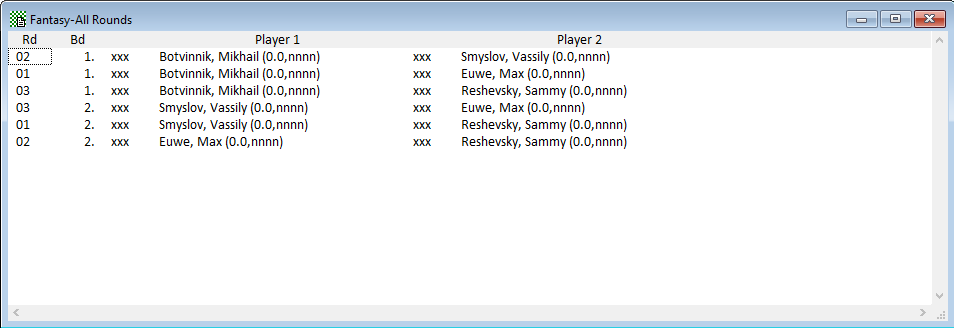
You can then use the Quick Entry keys to enter the results, reading across the rows in the crosstable, in this case L,W,D (games in row 1), W, D (games in row 2 after the diagonal) and L (only game right of the diagonal in row 3).
Copyright © 2026 Thomas Doan