Dialog Box: Add/Edit a Section |
The "Add/Edit a Section" dialog box appears whenever you add a new section (by selecting the operation Section>Add), or double click on an existing section in the Sections Window. This has a header section (described immediately below) and three or more tabs, depending upon the type of section.
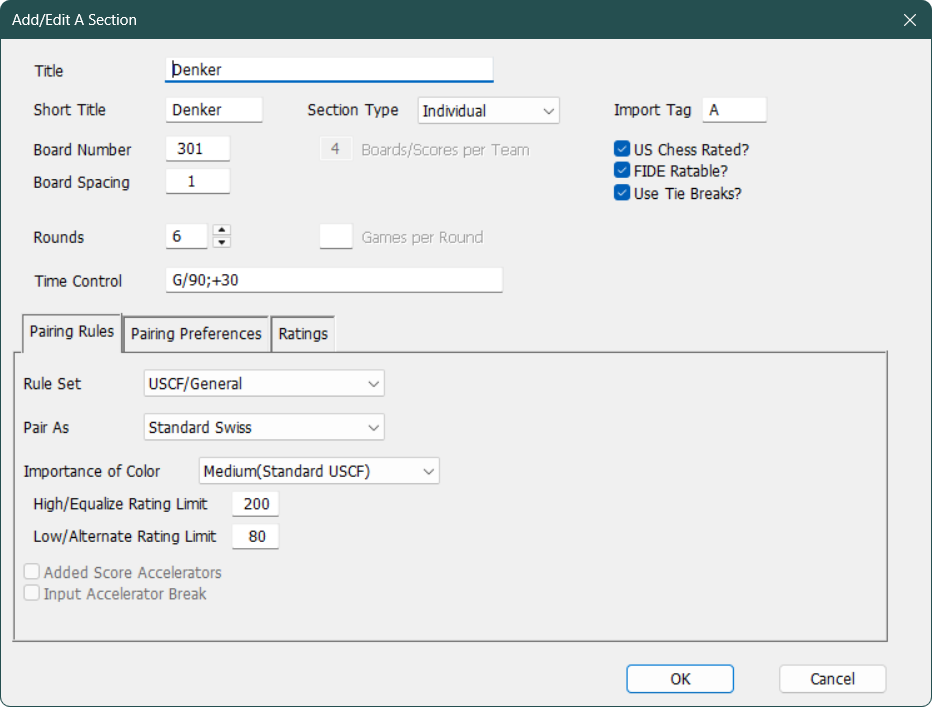
The header of the dialog has the following fields:
Title
This is the long title which will be displayed on reports. In this case, "K12 Championship"
Short Title
An abbreviated title (up to 10 characters) which will appear in the many dialogs, so you want it to be specific to each section. Here, "K12".
Board Number
The number assigned to the first board in this section. For a small tournament, just start at board number 1. For larger tournaments, see How To: Assign Board Numbers for details.
Board Spacing
The value by which board numbers will be incremented. The default is 1, which is almost always used, except for team vs team or bughouse tournaments if you number individual boards.
Section Type
Select from "Individual", "Individual/Team", "Pairs", "Team vs Team", and "Board-Weighted Team". See Team Tournaments for details on the various types of team tournaments supported by WinTD. Pairs is used for Bughouse tournaments (where participants are in two-player teams).
Boards/Scores per Team
For team vs team sections, use this field to specify the number of boards per team. For individual/team tournaments, it's the number of top scores which count for team results.
Import Tag
This can be used to to identify this section if you are importing tournament entries from a spreadsheet or text file and are including players from more than one section in the import file. This can be up to three (case-sensitive) characters if you are using the newer PTOZ format, and just one (case-sensitive) character in the older PTO format.
US Chess Rated?
This matters only if you are going to be using WinTD to prepare a ratings report to send to the US Chess.
FIDE Ratable?
This indicates whether the games in this section are being played under conditions which are FIDE ratable. This matters only if you are going to be using WinTD to prepare a ratings report to send to FIDE.
Use Tie Breaks?
Controls whether or not tie break information will be computed when you do Section>Update Scores/Standings. This choice will be reflected when you sort by or show the standings in Player windows.
Rounds
The number of planned rounds for this section. Note that if you are playing more than one game per round (Games Per Round below), just count the number of rounds that you will pair, not the number of games. (A five round double blitz will have 5 here and 2 in Games Per Round).
Games Per Round
For tournaments in which players play each other more than once per round (double-blitz tournaments, for instance), enter the number of games per round in this field. Leave it blank for the default case of one game per round. See multiple game tournaments for more information. Note that you can only specify multiple games per round for individual or combined individual/team sections—this feature is not supported for team (or board-weighted team) sections.
Time Control
Include a description of the time control here. This will be used in rating reports, and will be included on printed pairings sheets.
This is used to choose the main rules that govern how the section will be paired.
.png)
Rule Set
This offers the choice of the Rule Set to apply to the pairings for the section. This will only offer the USCF/General choice if this is the older format (PTO) file and will only offer the FIDE(2025) choice if the tournament is in FIDE Mode.
Pair As
This chooses the overall pairing style of the section. What choices are available here will depend upon the Rule Set that you have chosen.
Standard Swiss
The standard Swiss System pairing system, according to US Chess or (optionally) FIDE Dutch rules.
Round Robin
Select this option to use a Round Robin pairing scheme rather than the Swiss System. Note that you cannot switch to a Round Robin after pairing a round. (You can switch to a Swiss if the Robin Robin falls apart due to withdrawals).
Standard Accelerated
1/6's Accelerated
All Rounds Accelerated
These are all accelerated variations of the standard Swiss System. Accelerated pairings violate the basic Swiss System principles for the first two rounds in an attempt to more quickly reduce the number of perfect scores. They also tend to reduce the number of early round mismatches. Only Standard Accelerated is available under the FIDE rule set.
Round Robin-Hybrid Swiss
In round one, this pairs as a Swiss, but after that, takes pairings from a Round Robin table with the "round" determined at least in part by Swiss principles. This is useful when the number of players in a section is too large for a regular round robin, and too small for a standard Swiss to work effectively. See Pairing System: Alternative Methods and Pairing System: Small Tournaments. This is not available under the FIDE rule set.
Scheveningen
Scheveningen is a special pairing system where the players are divided into two teams, and all on one team play all on the other. See Pairing System: Alternative Methods.
Decelerated
This is designed to delay, rather than accelerate, pairing the top players. It's can be used in a Swiss when the number of players is too small relative to the number of rounds. See Pairing System: Alternative Methods and Pairing System: Small Tournaments. This is not available under the FIDE rule set.
1-2, 3-4
In round one, this pairs the highest ranked player with the second highest, third with the fourth, etc. and does similar pairings in subsequent rounds. See Pairing System: Alternative Methods. This is not available under the FIDE rule set.
Ladder
This is an experimental system for dealing with informal "tournaments" within a club where the primary goal is to give everyone a reasonably competitive game. The scores are only one factor in determining pairings (in, for instance, 1-2, 3-4 pairings, pairings are still based primarily upon score); closeness is ratings is also considered. And repeating earlier pairings is permitted.
With the exception of Round-Robin and Scheveningen, all other pairing methods pair round by round based upon scores, ratings and colors. This chooses how important color is to the pairing process.
The two most common will be Medium(Standard USCF) and High(FIDE Dutch). The former requests the pairing methods described in Pairing System: Evaluating Pairings and the latter in Pairing System: FIDE Dutch. To summarize the differences: the USCF style will try to correct the maximum number of colors, but puts a limit on how far pairings will be allowed to deviate from the "natural" pairings to achieve that, while the FIDE style will always get as many colors correct as possible and has a specific set of procedures for achieving that. Other options are High which aims to correct the maximum colors but uses US Chess style evaluation of pairings rather than the algorithmic FIDE Dutch system. Also available are Low and None. None would be appropriate if you are running a section where no player is disadvantaged due to color, such as a double-blitz section so each round each player gets one game with White and one with Black. Low is for a section where the disadvantage is relatively minor, such as a team vs team section with an even number of boards. With a low level of importance, corrections will only be made to avoid major color problems, like three-in-a-row, or more than +2 on a color. Given the pairings, colors will still be assigned by standard methods.
The only choices here if you are using the FIDE Rule Set are High(FIDE Dutch) and None.
High/Equalize Limit
Low/Alternate Limit)
These are used in any Swiss-based pairing method, other than the FIDE Dutch to provide a guide for how far pairings are allowed to be adjusted for correcting colors. (FIDE Dutch only uses the ratings to rank the players; not to evaluate pairings). Under the Medium(Standard USCF) choice for Importance of Color, there are two values: a High/Equalize Limit which is used when a swap is designed to achieve equalization (same number for Blacks as Whites), and a Low/Alternate Limit for achieving alternation (Black and White in alternate rounds). (See Pairing System: Color Correction for details). The usual settings in a US Chess tournament (and the default values in WinTD) are 200 for equalization and 80 for alternation.
Note that these are also used to guide changes that are made to natural pairings for other reasons, such as to avoid a repeat pairing or to avoid teammates playing each other. While there is no limit to how large a change would be made to correct those, there are often several different ways to fix them, and a "small" change (below the Low Limit) will be preferred over a larger one.
Added Score Accelerators
Input Accelerator Break
These check boxes will be available if one of the accelerated pairing systems is selected and you are using the USCF/General Rule Set. Added Score Accelerators treats high ranking players for pairing purposes, as if they have extra points. The alternative (default) is the more efficient method which uses both top-half draws and losses as opponents for bottom-half winners. (In Added Score Accelerators, top-half draws generally play each other). Input Accelerator Break allows you to control the break point between the top and bottom "halves"—don't use this unless you really know what you're doing.
These control pairing preferences—rules to control whether or not two players are allowed to play each other.
.png)
These should all be read as a continuation of the Pairing Rules for Players with phrase. The options are described in much greater detail in Pairing System: Teams and Clubs.
Same Team Codes
The three choices are "Ignore" (no special treatment for teammates), "Don't" (a virtually complete ban, only if the alternative is to pair some players a second time) and "If Required". For "If Required", WinTD will try to pair a section without pairing teammates, but it will not break up a score group just to avoid pairing teammates.
Same Club Codes
The three choices are "Ignore" (again, no special treatment for clubmates), "Avoid" (basically like the "If Required" for Same Team Codes, except it's a lower priority than team codes), and "Force" which actually tries to pair players with the same "club" code, though it won't break up a score group to do that.
Same State/Country
The options here are "Ignore" (again, no special treatment), "Avoid" (similar to the "Avoid" in the Club Codes, but even a lower priority), and "Avoid (if < 25%)" which tries to avoid pairing players with the same State/Country code, but only if that code represents fewer than 25% of the active players.
.png)
Pairing Numbers by
Each player can have up to two ratings (a main rating and a second or local rating) that are in use in a tournament. This determines how these are used. "Main Only" and "Main; Second if Unrated" are by far the most common, but you can choose to make the "second" rating the dominant one. See Pairing Numbers for details.
Main Rating Field
This chooses what the Main Rating field represents. If this is one of the USCF or FIDE ratings, it will be updated automatically if you update the player information from the USCF or FIDE database.
Second Rating Field
This chooses what the Second/Local Rating field represents. If this is one of the USCF or FIDE ratings, it will be updated automatically if you update the player information from the USCF or FIDE database.
ID Field
This chooses that the ID field represents. This will usually be the US Chess or FIDE ID, but you can choose any system you want—"User defined" is an option.
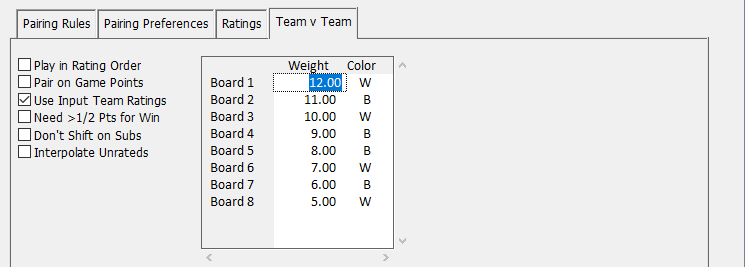
Play in Rating Order
If teams are required to play in rating order, check this box. They will be automatically assigned to boards based upon their ratings. If team players can play in any order, leave it unchecked and you will have to manually adjust the board order.
Pair on Game Points
Turn this on if you want teams to be paired based on their total game points (i.e. total points of games played by individual players), rather than match points. If you select this, standings will also be computed on game points.
Use Input Team Ratings
The standard practice in WinTD is to compute average team ratings and use them to assign pairing numbers. However, if you are assigning "seeds" from sources other than current ratings, you need to check this box and follow the directions in How To: Use Seedings Not Ratings.
Need >1/2 Pts for Win
If you check this, a team needs to score more than half the points possible in a round to receive a full match point. For instance, in a four board match, if a team which has only two players show is paired with an absent team, it would get two board points, but only 1/2 match point, since it has scored only 2 out of 4. The other team obviously gets 0 of each. Note, by the way, that the result in the Game Result dialog box will still show a forfeit "win" for first team. The adjustment is made whenever match points are computed.
Don't Shift on Subs
This affects how substitutions are handled. By default, when you use the Board Results dialog box to substitute in one or more players, WinTD will shift any players up to higher boards to fill in gaps, so that players play in the order specified in the Team Setup dialog box. If you turn on Don't Shift on Subs, WinTD will substitute player(s) onto the vacated board(s) directly, rather than shifting players up to fill gaps. The US Amateur Teams and the Olympiads both would have Don't Shift on Subs turned off.
Interpolate Unrateds
If you turn this on, WinTD will use estimated rating numbers when computing the team average rating. An unrated playing top board is estimated at 50 points above the player on board two, while unrateds on bottom boards drop 50 points a board from the bottom rated player.
Board Weights/Colors
If this is a board-weighted team section, this will be available for you to put in the weights (in the Weight column) and colors in the Color column (type W's and B's for that).
Copyright © 2026 Thomas Doan