


This pops up when you do Report-Print Team Results Sheets on a Games Window for a team vs team section. These are separate score sheets for each team vs team match.
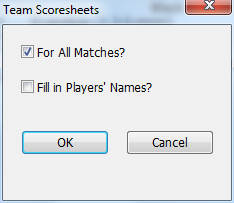
For All Matches?
If you have more than one game selected, this will queue up a separate sheet for each; otherwise, it will just do the top selected one from the list.
Fill in Players' Names?
If you choose this, instead of blanks lines for the names, it will fill in what would be the current roster for the teams.
Related Topics:
WinTD Help Contents
Team Windows
Team Files
How To: Add Players to a Team
How To: Add Teams to a Team Section
How To: Change Board Orders of a Team
How To: Create a Team Tournament Section
How To: Enter Scores in Team Sections
How To: List Individuals in a Team Section
How To: Show/Print Team Standings (combined tournaments)
How To: Show/Print Team Standings (team tournament)
How To: Use Master Files for Team Tournaments
How To: Use Seedings Not Ratings
Team Tournaments
Dialog Box: Add/Edit a Section
Dialog Box: Add/Edit a Team
Dialog Box: Board Results
Dialog Box: Board Weights
Dialog Box: Team Setup
Samples: Team Pairing Sheets
Samples: Team Standings
WinTD Help Contents
Team Windows
Team Files
How To: Add Players to a Team
How To: Add Teams to a Team Section
How To: Change Board Orders of a Team
How To: Create a Team Tournament Section
How To: Enter Scores in Team Sections
How To: List Individuals in a Team Section
How To: Show/Print Team Standings (combined tournaments)
How To: Show/Print Team Standings (team tournament)
How To: Use Master Files for Team Tournaments
How To: Use Seedings Not Ratings
Team Tournaments
Dialog Box: Add/Edit a Section
Dialog Box: Add/Edit a Team
Dialog Box: Board Results
Dialog Box: Board Weights
Dialog Box: Team Setup
Samples: Team Pairing Sheets
Samples: Team Standings