


Use this to show standings for "combined" individual team tournaments. For true team vs team tournaments, use Reports-Print X Table or Reports-Show Prize Lists to get team standings/results. See Team Tournaments for details.
- Go to the Sections Window and select the section(s) for which you want team standings.
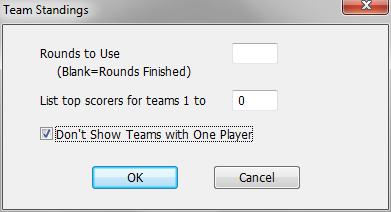
Rounds to Use
You usually leave this blank, which gives the team standings through all completed rounds. However, you can put in a different value if you want to show the information through an earlier round.
List Top Scorers...
You can choose to include the top scorers (in tie break order) for teams on the standings list. This listing will include all players on a team whose scores either count or are tied for the last place that counts. A blank value means that you want the detailed listing for all teams. If you want just the team information along, use a 0.
Don't Show Teams with One Player
Since single players usually are ineligible for team awards, checking this box will eliminate them from the listing.
See Samples: Team Standings for details on the printout.
Notes
- If you have more than one section selected when you do this operation, WinTD will display a separate Reports window for each section.
- If you have the Team Window open for the Team File which includes the teams competing in the tournament, WinTD will include their full names. Otherwise, it will list only the abbreviations. You'll get a warning about the lack of a team file if you do that.
- You set the maximum number of scores which count in the Add/Edit a Section Dialog Box. If you also require a minimum number of scores to be eligible for a team award, the number of players per team is included in the print out. WinTD doesn't automatically leave smaller teams out.
WinTD Help Contents
Team Windows
Team Files
How To: Add Players to a Team
How To: Add Teams to a Team Section
How To: Change Board Orders of a Team
How To: Create a Team Tournament Section
How To: Enter Scores in Team Sections
How To: List Individuals in a Team Section
How To: Show/Print Team Standings (team tournament)
How To: Use Master Files for Team Tournaments
How To: Use Seedings Not Ratings
Team Tournaments
Dialog Box: Add/Edit a Section
Dialog Box: Add/Edit a Team
Dialog Box: Board Results
Dialog Box: Board Weights
Dialog Box: Team Scoresheets
Dialog Box: Team Setup
Samples: Team Pairing Sheets
Samples: Team Standings